
Building Expressions: Using Conditional Algebra to Drive Geometry
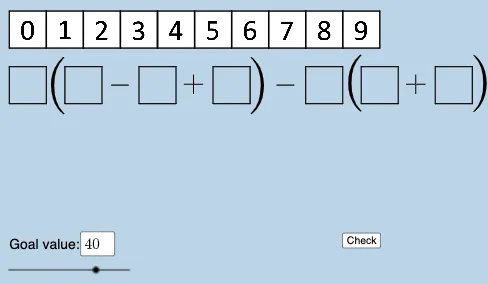
Loading the math board and drawing, please wait…
This example demonstrates how to create and combine mathematical expressions—especially piecewise/conditional ones—to control the construction and labeling of geometric figures in GeoGebra. Key concepts include constructing algebraic expressions, working with fractional (rational) forms, using conditional logic via If to define piecewise rules, and mapping expression outputs to geometric objects for dynamic visualization. Construction highlights: Polygon is used to build polygonal shapes (e.g., multiple polygons such as poly0/poly3/poly7); FractionText generates displayed fraction-based text for clarity; If implements the conditional behavior that switches definitions based on criteria; and Textfield provides interactive inputs so expressions or parameters can be updated on the fly. The setup includes many point objects (e.g., A*, B, C, H, P) along with expression/function objects (f, g, h, i, etc.) that feed into the geometry. Suitable for middle/high school and early university learners, it works well for teaching expression construction, piecewise reasoning, and dynamic geometry/graphing workflows.
GeoGebra Commands & Parameters
Polygon(A0, B, 4) → poly0, f, g, h, i, A, CPolygon(A3, H, 4) → poly3, j, k, l, m, E, GPolygon(A7, P, 4) → poly7, n, p, q, r, I, KPolygon(A1, D, 4) → poly1, s, t, a, b, M, OPolygon(A6, N, 4) → poly6, c, d, e, f_1, Q, SPolygon(A2, H2, 4) → poly2, k_1, l_1, m_1, n_1, W, ZPolygon(A8, A8 + (2, 0), 4) → poly8, g_1, h_1, i_1, j_1, U, VPolygon(A9, T, 4) → poly9, p_1, q_1, r_1, s_1, A_1, B_1Polygon(A4, J, 4) → poly4, t_1, a_1, b_1, c_1, C_1, D_1Polygon(A5, L, 4) → poly5, d_1, e_1, f_2, g_2, E_1, F_1Polygon(K_1, L_1, 4) → poly10, l_2, m_2, n_2, p_2, M_1, N_1Polygon(O_1, P_1, 4) → poly12, q_2, r_2, s_2, t_2, Q_1, R_1Polygon(S_1, T_1, 4) → poly13, a_2, b_2, c_2, d_2, U_1, V_1Polygon(C_2, D_2, 4) → poly15, i_3, j_3, k_3, l_3, E_2, F_2Polygon(G_2, H_2, 4) → poly16, m_3, n_3, p_3, q_3, I_2, J_2Polygon(G_{3}, H_{3}, 4) → poly17, m_{4}, n_{4}, p_{4}, q_{4}, I_{3}, J_{3}Polygon(C_{3}, D_{3}, 4) → poly14, i_{4}, j_{4}, k_{4}, l_{4}, E_{3}, F_{3}FractionText(u) → text4If(aleft > aright, "Left side is bigger.", aleft < aright, "Right side is bigger", "Both sides are equal!") → text9Textfield(w) → InputBox1If(o_1 < 0, "less than", o_1 > 0, "greater than", o_1 ≟ 0, "equal to") → text12
AI Drawing Prompt Reference
Draw a complex geometric figure composed of multiple polygons. The figure should include various points, line segments, and regions connected by conditional logic. The construction order should start from basic polygons and gradually add more shapes to form the overall structure. The figure should clearly show the connection relationships and overall layout.
The prompt above was compiled from the original drawing commands and is for reference only.