
Inverse Problems - Triangles
Loading the math board and drawing, please wait…
In collections
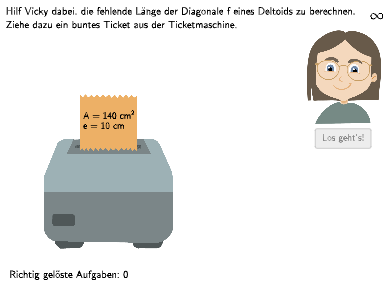
Deltoid - Flächeninhalt und Umkehraufgaben
This example demonstrates how to solve inverse problems - triangles, particularly by transforming formulas to solve quadrilaterals. Students can explore the concept of inverse problems by adjusting the sides and angles of the triangles. The example involves core math concepts including geometry, polygons, and inverse problems. The construction points include using GeoGebra commands and objects such as Textfield, Shuffle, Polygon, etc. This example is suitable for 7-8 grade students, particularly those learning geometry and polygons.
GeoGebra Commands & Parameters
Textfield(input1) → InputBox1Shuffle({1, 2}) → ModusList, {1, 2}Shuffle(Sequence[i, i, 3, 15]) → eList, {5, 12, 13, 9, 15, 14, 7, 8, 4, 10, 6, 3, 11}Shuffle({2, 4, 6, 8, 10, 12, 14} \ {ewert}) → fList, {14, 8, 12, 2, 4, 6}Polygon(PtopLeftCornerFeedback, PtopRightCornerFeedback, PbottomRightCornerFeedback, PbottomLeftCornerFeedback) → rectangleCorrect, rectangleCorrectS3, rectangleCorrectS4, rectangleCorrectS2, rectangleCorrectS1Shuffle(Sequence[Random[0, 10], i, 1, 100]) → randomNosForX, {1, 3, 9, 7, 9, 3, 7, 8, 1, 3, 4, 6, 3, 4, 4, 10, 2, 6, 3, 5, 2, 3, 4, 8, 8, 0, 0, 2, 10, 4, 1, 6, 7, 10, 2, 6, 6, 5, 1, 8, 10, 8, 9, 7, 3, 4, 2, 1, 8, 10, 5, 2, 6, 10, 6, 10, 6, 3, 1, 10, 0, 6, 2, 10, 9, 9, 0, 10, 3, 6, 4, 0, 0, 9, 5, 4, 10, 2, 7, 4, 5, 3, 0, 1, 0, 7, 3, 4, 3, 9, 3, 1, 10, 9, 9, 9, 9, 7, 1, 3}Element(randomNosForX, Mod[questionCount, 100] + 1) → numXShuffle(Sequence[Random[0, 10], i, 1, 100]) → randomNosForY, {8, 2, 2, 8, 8, 9, 0, 1, 6, 4, 1, 8, 1, 8, 6, 2, 4, 7, 0, 10, 9, 7, 0, 2, 2, 6, 10, 5, 6, 8, 9, 0, 5, 8, 4, 10, 7, 3, 7, 7, 7, 7, 5, 9, 4, 10, 9, 3, 1, 1, 4, 6, 3, 6, 6, 6, 0, 9, 8, 9, 4, 2, 1, 7, 0, 5, 2, 3, 6, 1, 10, 0, 1, 9, 9, 7, 3, 3, 0, 8, 10, 2, 0, 1, 2, 4, 5, 4, 9, 5, 6, 7, 0, 6, 5, 9, 9, 8, 9, 10}Element(randomNosForY, Mod[questionCount, 100] + 1) → numYAppend(true, Sequence[If[randomNosForX(i) ≟ randomNosForX(i - 1), false, true], i, 2, 100]) → stayXAppend(true, Sequence[If[randomNosForY(i) ≟ randomNosForY(i - 1), false, true], i, 2, 100]) → stayYRemove(Sequence[If[stayX(i), randomNosForX(i), 0], i, 1, 100], Sequence[0, i, 1, 100]) → randomNosForXwithoutRepeatRemove(Sequence[If[stayY(i), randomNosForY(i), 0], i, 1, 100], Sequence[0, i, 1, 100]) → randomNosForYwithoutRepeatElement(randomNosForXwithoutRepeat, Mod[questionCount, Length[randomNosForXwithoutRepeat]] + 1) → numXwithoutRepeatElement(randomNosForYwithoutRepeat, Mod[questionCount, Length[randomNosForYwithoutRepeat]] + 1) → numYwithoutRepeatSelectedIndex(DD1) → index1TextToUnicode(erlaubteZeichen) → ZeichenLErlaubtTextToUnicode(Text[InputBox1]) → ZeichenLInputPolygon(B, C, D, E) → v1, b, c, d, ePointIn(v1) → TicketAnchor1Shuffle({1, 2, 3, 4, 5}) → TicketFarbenList, {4, 2, 1, 3, 5}SpeechBubbleRight(A, 9, 1.8) → Vieleck1
AI Drawing Prompt Reference
Construct a quadrilateral in the plane using four ordered points, connecting them to form a closed, rectangle-like shape. Use these four points as the polygon’s vertices and keep the vertex order consistent so the edges match correctly. Then place one additional anchor point inside the quadrilateral to serve as a reference for positioning. Finally, add a right-facing speech-bubble style label near the anchor point to indicate or explain the figure.
The prompt above was compiled from the original drawing commands and is for reference only.