
Braille Letter Cube
Loading the math board and drawing, please wait…
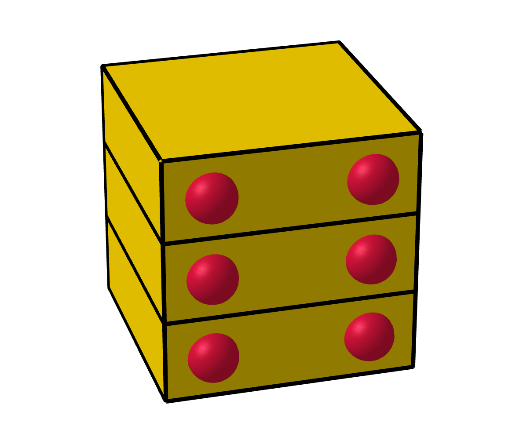
This example demonstrates a 3D cube constructed from Braille letters, showcasing geometric shapes and spatial transformations. It involves core math concepts like solid geometry, polygon construction, and spatial visualization. The construction uses commands such as Polygon, Prism, Translate, Sphere, and Rotate from GeoGebra. Suitable for high school and above, it helps students understand 3D modeling and spatial geometry applications.
GeoGebra Commands & Parameters
Polygon((-2, -2, 0), (2, -2, 0), (2, 2, 0), (-2, 2, 0)) → q1, f, g, h, iPrism(q1, 4 / 3) → a, A, edge1, edge2, edge3, edge4, edgeAB, edgeBC, edgeCD, edgeAD, B, C, D, face1, face3, face4, face2, faceABCDTranslate(a, Vector[(0, 0, 4 / 3)]) → a1Translate(a, Vector[(0, 0, 8 / 3)]) → a2Sphere((-1.25, -2, 2 / 3), 0.4) → bSphere((-2, -1.25, 2 / 3), 0.4) → cSphere((-1.25, 2, 2 / 3), 0.4) → dSphere((1.25, 2, 2 / 3), 0.4) → eSphere((1.25, 2, 6 / 3), 0.4) → jSphere((-1.25, 2, 6 / 3), 0.4) → kSphere((-2, -1.25, 6 / 3), 0.4) → lSphere((-1.25, -2, 6 / 3), 0.4) → mSphere((-1.25, -2, 10 / 3), 0.4) → nSphere((-2, -1.25, 10 / 3), 0.4) → oSphere((1.25, 2, 10 / 3), 0.4) → pSphere((-1.25, 2, 10 / 3), 0.4) → qRotate(a, nb) → a'Rotate(aa, nb) → aa'Rotate(b, nb) → b'Rotate(c, nb) → c'Rotate(d, nb) → d'Rotate(e, nb) → e'Rotate(a1, nm, zAxis) → a1'Rotate(a11, nm, zAxis) → a11'Rotate(j, nm, zAxis) → j'Rotate(k, nm, zAxis) → k'Rotate(l, nm, zAxis) → l'Rotate(a2, nt, zAxis) → a2'Rotate(a22, nt, zAxis) → a22'Rotate(n, nt, zAxis) → n'Rotate(m, nm, zAxis) → m'Rotate(o, nt, zAxis) → o'Rotate(p, nt, zAxis) → p'Rotate(q, nt, zAxis) → q'
AI Drawing Prompt Reference
Draw a cube constructed from Braille letters, demonstrating geometric shapes and spatial transformations. Start by creating a square base and extend it upward to form a cube. Place a sphere at each vertex of the cube and a slightly larger sphere at the center. Finally, rotate the entire structure around the Z-axis to give the Braille letters a three-dimensional appearance.
The prompt above was compiled from the original drawing commands and is for reference only.