
Black Thread: Dynamic Geometry with Perimeter, Trigonometry, and Random Variable
Loading the math board and drawing, please wait…
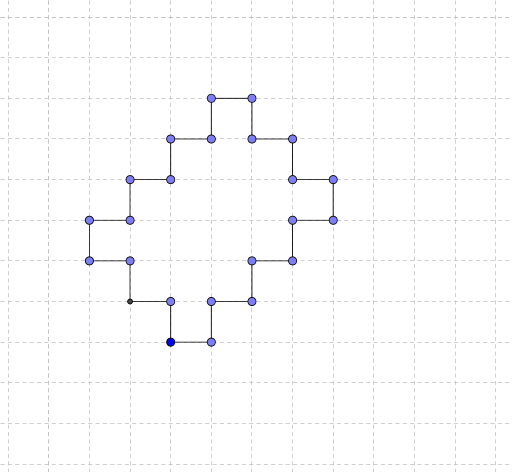
This example demonstrates a complex geometric construction centered on a 'black thread' visual theme, built from circles, points, segments, and intersections. It illustrates how perimeter, frequency distribution, and trigonometric functions interrelate within a dynamic geometry environment. Core mathematical concepts include circle perimeter, triangle properties, trigonometric periodicity, random variable distributions, and geometric transformations such as dilation and congruence. The construction uses GeoGebra commands: Circle to create circle c, Point to define points A, B, C, etc., Segment to draw connecting lines, and Intersect to find intersection points. Numerous labeled objects (f, g, d, h, e, i, k, etc.) are layered to form a multi-level structure that visually traces a 'black thread' path. This is suitable for high school or university students exploring the intersection of geometric construction with trigonometry and probability, and serves as a creative teaching tool for understanding transformations and random variables in geometry.
GeoGebra Commands & Parameters
Circle(A, 1) → cPoint(c) → BPoint(c) → CSegment(C, A) → fSegment(A, B) → gCircle(B, 1) → dPoint(d) → DSegment(D, B) → hCircle(D, 1) → ePoint(e) → ESegment(D, E) → iCircle(E, 1) → kPoint(k) → FSegment(F, E) → jCircle(F, 1) → pPoint(p) → GSegment(F, G) → lCircle(G, 1) → qPoint(q) → HSegment(H, G) → mCircle(H, 1) → rPoint(r) → ISegment(H, I) → nCircle(I, 1) → sPoint(s) → JSegment(J, I) → tCircle(J, 1) → c_1Point(c_1) → KSegment(K, J) → aCircle(K, 1) → d_1Point(d_1) → LSegment(L, K) → bCircle(L, 1) → e_1Point(e_1) → MSegment(M, L) → f_1Circle(M, 1) → g_1Point(g_1) → NSegment(N, M) → h_1Circle(N, 1) → k_1Point(k_1) → OSegment(O, N) → i_1Circle(O, 1) → p_1Point(p_1) → PSegment(O, P) → j_1Circle(P, 1) → q_1Point(q_1) → QSegment(Q, P) → l_1Circle(Q, 1) → r_1Point(r_1) → RSegment(Q, R) → m_1Circle(R, 1) → s_1Point(s_1) → SSegment(S, R) → n_1Circle(S, 1) → t_1Point(t_1) → TSegment(S, T) → a_1Circle(T, 1) → c_2Point(c_2) → USegment(U, T) → b_1Circle(U, 1) → d_2Point(d_2) → VSegment(U, V) → f_2Circle(V, 1) → e_2Point(e_2) → WSegment(V, W) → g_2Circle(W, 1) → last_1Circle(C, 1) → last_2Intersect(last_1, last_2) → Z, A_1, ,Segment(W, A_1) → h_2Segment(A_1, C) → i_2
AI Drawing Prompt Reference
Start with a unit circle centered at a fixed point. Choose a point on its circumference, then draw a new unit circle centered at that point. Connect the two centers with a segment. Repeat this process: each new circle is centered at a point randomly selected on the previous circle, and a segment connects the new center to the previous one. This creates a chain of unit circles and equal-length segments, forming a black-thread-like path. The figure includes multiple circles, points, segments, and intersections, illustrating perimeter, trigonometric periodicity, random variable distribution, and geometric transformations.
The prompt above was compiled from the original drawing commands and is for reference only.