
Biped and Almond Geometric Demo
Loading the math board and drawing, please wait…
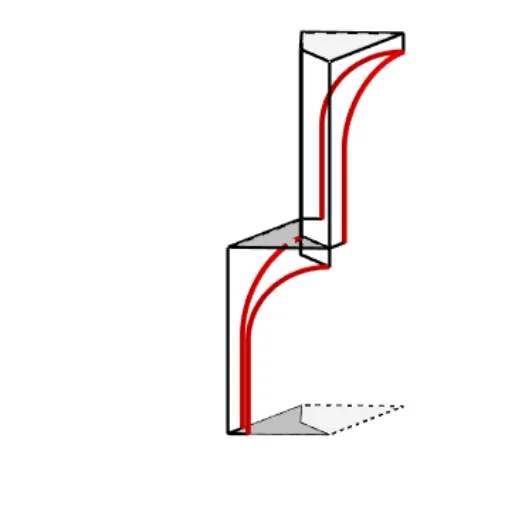
This example demonstrates the parametric construction and intersection calculation of biped and almond shapes. It involves core mathematical concepts such as parametric equations, derivatives, polygon construction, vector operations, and analytical geometry. Key GeoGebra commands/objects used in the construction include Intersect, Point, Rotate, Segment, OrthogonalLine, Polygon, CircleArc, Plane, Mirror, Vector, and Circle. It is suitable for high school and above, ideal for learning and visualizing parametric equations, derivative applications, and geometric constructions.
GeoGebra Commands & Parameters
Intersect(xAxis, yAxis) → APoint(xAxis) → BRotate(B, 45°) → B'Segment(B, C) → fSegment(B', C) → gOrthogonalLine(B', g) → hOrthogonalLine(B, f) → iIntersect(h, i) → DPolygon(A, B, D, B') → vierhoek1, a, b, d, b'CircleArc(H, I, F) → boog0Segment(G, J) → bovenSegment(G, A) → kSegment(A, E) → onderSegment(F, E) → vertmidSegment(J, I) → vertkleinPlane(A, C, G) → diagMirror(G, diag) → G'Mirror(J, diag) → J'Segment(G', J') → boven'Mirror(J, diag) → J'_1Mirror(I, diag) → I'Segment(J'_1, I') → vertklein'Mirror(boog0, diag) → boog0'Mirror(F, diag) → F'Mirror(E, diag) → E'Segment(F', E') → vertmid'Mirror(A, diag) → A'Mirror(E, diag) → E'_1Segment(A', E'_1) → onder'Segment(I, K) → jSegment(J, L) → lSegment(L, K) → mSegment(K, I') → nSegment(L, J'_1) → pVector(A, B) → uVector(A, B') → vSegment(J, N) → qSegment(J'_1, O) → rSegment(L, M) → sSegment(O, M) → tSegment(M, N) → cCircle(B, 0.2) → eIntersect(e, f) → T,CircleArc(S, R, V) → boog1Segment(N, P) → boven1Segment(U, V) → vertmidden1Segment(U, J) → onder1Segment(P, R) → vertklein1Mirror(U, diag) → U'Mirror(V, diag) → V'Segment(U', V') → vertmidden1'Mirror(boog1, diag) → boog1'Mirror(N, diag) → N'Mirror(P, diag) → P'Segment(N', P') → boven1'Mirror(U, diag) → U'_1Mirror(J, diag) → J'_2Segment(U'_1, J'_2) → onder1'Vector(D, B') → wVector(D, B) → u_1Vector(B', C) → v_1Vector(B, C) → w_1Polygon(O, M, N, P') → vierhoek2, o_1, m_1, n_1, p'Polygon(G, J, L, J') → vierhoek3, g_1, j_1, l_1, j'Polygon(B, C, B', D) → vierhoek4, b_1, c_1, f_1, d_1Point(boog0) → WVector(W, I) → e_1Point(boog0') → ZVector(Z, I') → h_1Point(boog1') → A_1Vector(A_1, R) → i_1Point(boog1) → B_1Vector(B_1, R) → k_1
AI Drawing Prompt Reference
Draw a geometric demo starting from the intersection of the x-axis and y-axis at the origin. Place a point on the x-axis and rotate it 45 degrees around the origin to get another point. Connect these two points to an upper point with segments, then draw perpendicular lines to these segments, intersecting at a new point. Form a quadrilateral using the origin, the x-axis point, the intersection point, and the rotated point. Add a circular arc, several segments connecting key points, and a plane defined by three points. Reflect some points across this plane and connect the reflected points to create symmetric segments. Finally, draw a small circle at the x-axis point and include additional auxiliary segments and arcs to complete the symmetric construction.
The prompt above was compiled from the original drawing commands and is for reference only.