
Binary and Geometric Construction Example
Loading the math board and drawing, please wait…
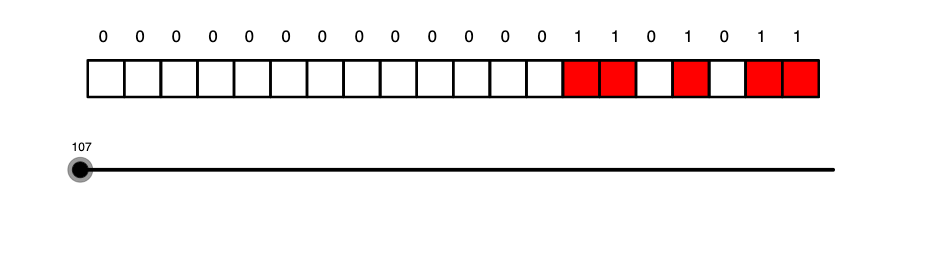
This example demonstrates the application of binary concepts in geometric figures. Key mathematical concepts include straight lines, variance, complex numbers, terms, and quadratic equations. Construction involves GeoGebra commands such as ToBase, Length, Sequence, Element, Append, and Join, using objects like a, text1, b, l1, c, text2, l3, l2, l4, l5, l6, d, l7, l8. Suitable for middle or high school mathematics to understand the relationship between geometry and algebra.
GeoGebra Commands & Parameters
ToBase(a, 2) → text1Length(text1) → bSequence(Polygon[(a, 0), (a + 1, 0), 4], a, 1, 20) → l1Length(l1) → cElement(text1, 3) → text2Sequence(If[Element[text1, a] ≟ "1", Polygon[(a, 0), (a + 1, 0), 4], NaN], a, 20, 1, -1) → l3Sequence("0", a, 1, 20 - b) → l2Append(l2, text1) → l4Sequence(Element[text1, a], a, 1, Length[text1]) → l5Join({l2, l5}) → l6Length(l6) → dSequence(If[Element[l6, a] ≟ "1", Polygon[(a, 0), (a + 1, 0), 4], NaN], a, 1, 20) → l7Sequence(Text[Element[l6, a], (0.3 + a, 1.5)], a, 1, 20) → l8
AI Drawing Prompt Reference
On a coordinate plane, draw a sequence of squares from x=1 to x=20, each with side length 1 and lower-left corner at integer coordinates. Convert a given integer to its binary representation and note its length. For each binary digit, if the digit is '1', draw a square at that position; if '0', draw nothing. Above each position, display the corresponding binary digit as text. The figure illustrates the correspondence between the binary expansion of an integer and a geometric sequence of squares.
The prompt above was compiled from the original drawing commands and is for reference only.