
Basics of Complex Numbers: Geometric Representation
Loading the math board and drawing, please wait…
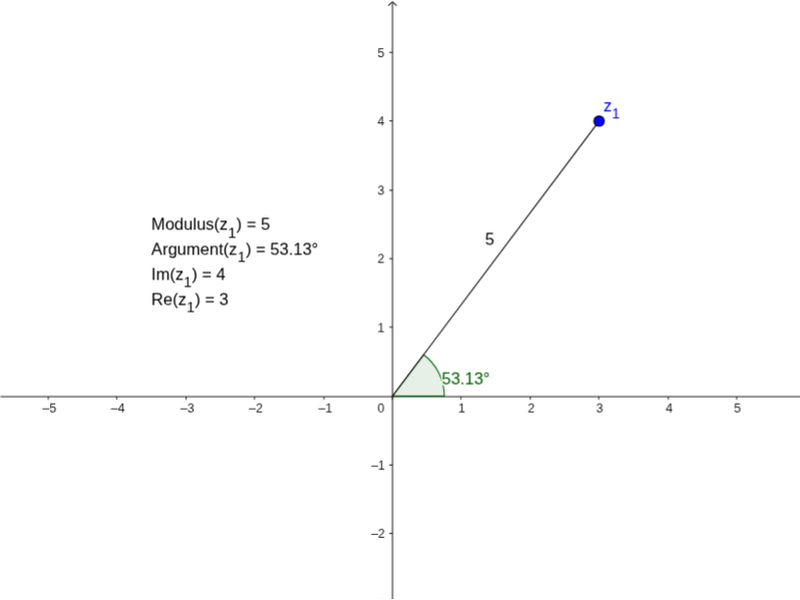
This GeoGebra example dynamically illustrates the geometric representation of complex numbers on the complex plane. It shows a complex number z_1 as a point, its modulus a as a segment from the origin, and its argument α as an angle, using the Segment and Angle commands. The core mathematical concepts include the algebraic form of complex numbers, the correspondence between complex numbers and points/vectors in the plane, modulus and argument, and the geometric interpretation of addition via the parallelogram rule. The construction uses the Segment command to draw the modulus, the Angle command to mark the argument, and a text object to display values. This resource is suitable for high school or early college students first learning complex numbers, and for teachers demonstrating the visual link between algebra and geometry, preparing students for further topics like complex arithmetic and Euler's formula.
GeoGebra Commands & Parameters
Segment((0, 0), z_1) → aAngle(xAxis, a) → α
AI Drawing Prompt Reference
Draw a complex plane with real and imaginary axes. Place a point representing a complex number. From the origin, draw a line segment to this point to show its modulus. Then, mark an angle at the origin between the positive real axis and this segment, representing the argument. The figure should clearly show the point, the segment, and the angle, illustrating the geometric representation of a complex number.
The prompt above was compiled from the original drawing commands and is for reference only.