
Basic Proofs In Plane Geometry - Example 6 (Scaffolded)
Loading the math board and drawing, please wait…
In collections
Circles Properties and Angle Properties of Circles
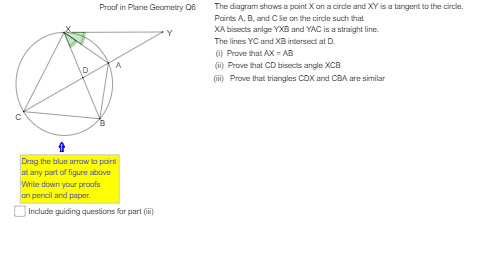
This example demonstrates how to use interactive dynamic geometry exercises to scaffold student learning of proofs in plane geometry. Key mathematical concepts include angles, circles, polygons, and triangles. Construction highlights: Utilizes Circle, Point, Segment, Tangent, AngularBisector, Intersect, Polygon, Midpoint, Angle, Distance, IsInRegion, If commands and objects in GeoGebra. Suitable for high school students or beginners practicing geometric proofs.
GeoGebra Commands & Parameters
Circle(O, 4) → cPoint(c) → BPoint(c) → XSegment(X, B) → gTangent(X, c) → b,Point(b) → YSegment(X, Y) → fAngularBisector(f, g) → h, iIntersect(c, h) → A', APolygon((x(X) + 0.15, y(X) + 0.05), (x(X) - 0.15, y(X) - 0.02), (x(A) - 0.1, y(A) - 0.05), (x(A) + 0.1, y(A))) → RectAX, e_1, f_1, i_1, j_1Polygon((x(A) + 0.1, y(A) + 0.05), (x(A) - 0.1, y(A)), (x(B) - 0.1, y(B)), (x(B) + 0.1, y(B))) → RectAB, t, a_1, c_1, d_1Midpoint(I, J) → K'Point(c) → CSegment(C, X) → dPoint(d) → ESegment(B, E) → eSegment(E, Y) → aIntersect(a, g) → DAngle(h, f) → αAngle(g, h) → βSegment(X, A) → jSegment(B, A) → kIntersect(c, a) → F, A_1Distance(A, B) → distanceABDistance(A, X) → distanceAXPoint(g) → GPoint(k) → HPolygon(G, B, H) → poly1, h_1, g_1, b_1Polygon(L, M, N, P, Q, R, S) → poly2, l, m, n, p, q, r, sAngle(A, B, X) → γIsInRegion(K, poly1) → show1If(IsInRegion[K, RectAX] ∨ IsInRegion[K, RectAB], true, false) → show2Point(d) → TPoint(a) → UPolygon(T, C, U) → poly3, u, t_1, c_2IsInRegion(K, poly3) → show3Point(e) → ZPolygon(U, C, Z) → poly4, k_1, l_1, m_1IsInRegion(K, poly4) → show4Angle(B, E, Y) → εPoint(a) → VPoint(k) → WPolygon(V, A, W) → poly5, w, v, a_2Point(d) → B_1Point(g) → C_1Polygon(B_1, X, C_1) → poly6, c_3, b_2, d_2If(IsInRegion[K, poly5] ∨ IsInRegion[K, poly6], true, false) → show5Angle(C, X, B) → ζAngle(D, A, B) → ηAngle(A, C, X) → δPolygon(C, D, X) → poly7, e_2, c_4, d_3IsInRegion(K, poly7) → show7Polygon(C, B, A) → poly8, a_3, c_5, b_3IsInRegion(K, poly8) → show8
AI Drawing Prompt Reference
Draw a circle with center at origin and radius 4. Place two points on the circle and connect them with a chord. From one of these points, draw a tangent line to the circle, and pick a point on the tangent. Connect this tangent point to the other circle point. Construct the angle bisector of the angle between the chord and the tangent, and let it intersect the circle at two points. Connect these intersection points to form a triangle. Add several auxiliary points on sides and inside the triangle, creating multiple small triangular and polygonal regions for interactive checking. Label several key angles and measure two side lengths. The overall figure is for step-by-step geometric proof practice.
The prompt above was compiled from the original drawing commands and is for reference only.