
Average Rate of Change: Secant Slope Quiz
Loading the math board and drawing, please wait…
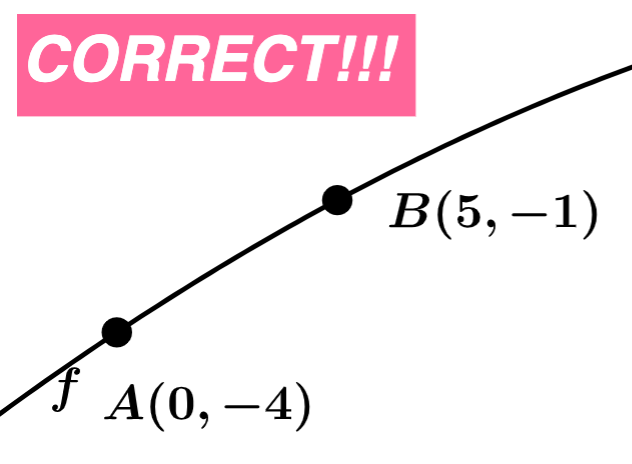
This GeoGebra example presents an interactive quiz that demonstrates how to find the average rate of change of a function between two points using the slope of the secant line. It emphasizes the geometric interpretation of average change rate as a slope computed from two points, and supports verification through dynamic updates and visual feedback. The core concepts include average rate of change, secant line construction, slope from two points, and the use of distance/coordinates to support calculations. The construction uses key GeoGebra commands from the provided summary: Sequence to generate sets of points or parameters, Random to vary the quiz instances, Line to draw the secant line, Intersect to locate relevant intersection points, Distance to compute separations, Slope and Textfield to compute and display slope values dynamically, Min/Max to compare or determine bounds, FitPoly to fit a polynomial to generated data when needed, and Text/FractionText to present results clearly. It leverages objects such as points (e.g., A, B, C variants), parameters (a, b, c, d, m, etc.), and labeled distance/annotation elements (e.g., distanceAC, TextAC, distanceCB, TextCB). Suitable for upper secondary to early calculus learners, classroom practice, or self-assessment focused on rate concepts and secant-line geometry.
GeoGebra Commands & Parameters
Sequence(i, i, -10, -1) → aSequence(i, i, -5, 5) → wSequence(i, i, -10, -1) → bSequence(i, i, 1, 10) → cUnion(b, c) → dRandom(-12, 12) → eLine(A, B) → gFractionText(Slope[f]) → text1FractionText(f(0)) → text2Intersect(h, i) → CDistance(A, C) → distanceACDistance(C, B) → distanceCBTextfield(n) → InputBox1Line(A, B) → pSlope(p) → oFractionText(n) → text3FractionText(n) → text6Union(Sequence[i, i, -9, -1, 1], Sequence[i, i, 1, 9, 1]) → l1Min(x(A), x(B)) → rFitPoly({A, B, B + (RandomElement[l1], RandomElement[l1])}) → sMax(x(A), x(B)) → d_1
AI Drawing Prompt Reference
Draw a function graph with two points A and B, and draw a secant line through these points. Calculate and display the slope of this secant line. Generate a series of random points and fit a polynomial function through these points. Calculate and display the distances from A to C and C to B, where C is the intersection of the secant line and the fitted polynomial function. Provide an input box for users to enter the slope of the secant line and display the calculated result.
The prompt above was compiled from the original drawing commands and is for reference only.