
Area of Triangles with Same Base and Same Height
Loading the math board and drawing, please wait…
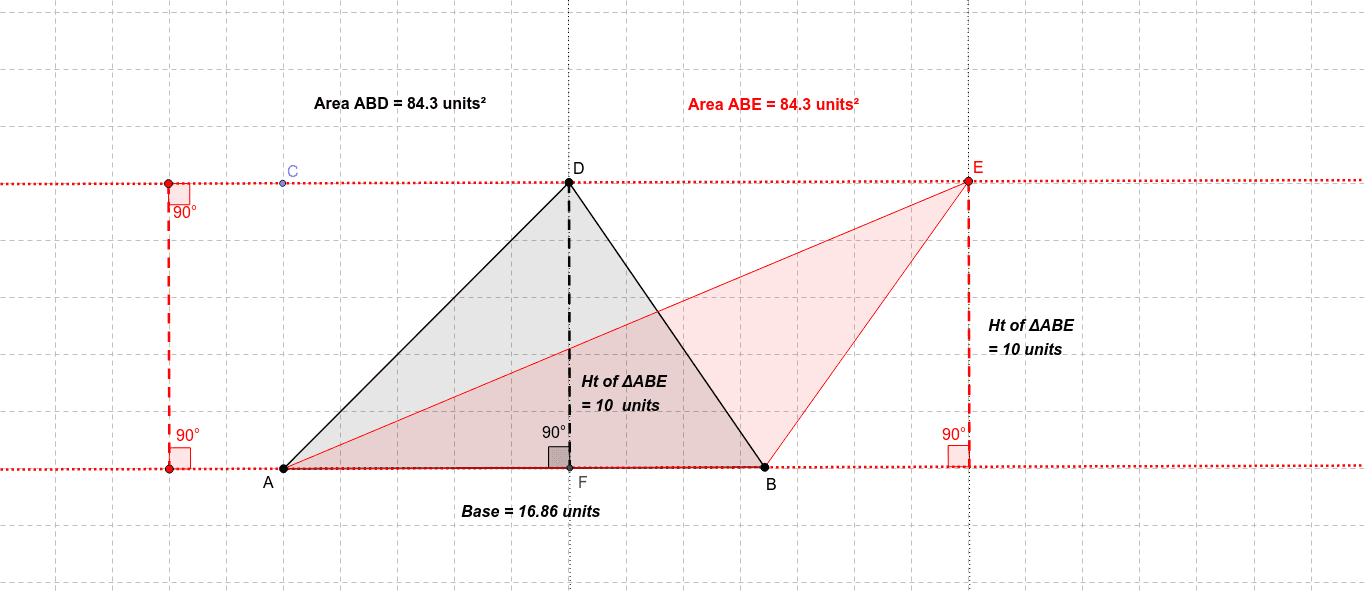
① This applet dynamically demonstrates that triangles sharing the same base and having the same height always have equal areas. ② The core mathematical concept is the triangle area formula (Area = base × height ÷ 2), emphasizing that when the base length and corresponding height are fixed, moving the vertex along a line parallel to the base keeps the area constant. ③ Construction highlights: Using GeoGebra commands such as Line, OrthogonalLine, Point, Intersect, Segment, Polygon, Rotate, Angle, and Distance, the applet constructs a base AB, parallel lines, perpendiculars, multiple triangles (poly1, poly2, etc.), and distance measurements (distanceDF, distanceAB). Sliders or draggable points allow changing the vertex position while the area is displayed in real time. ④ This is suitable for middle school geometry teaching, helping students understand the invariant area property of triangles with equal base and height, and can also be used to explore relationships between area, base, and height, or as an interactive demonstration.
GeoGebra Commands & Parameters
Line(A, B) → aOrthogonalLine(A, a) → bPoint(b) → COrthogonalLine(C, b) → cPoint(c) → DPoint(c) → ELine(D, b) → hIntersect(h, a) → FSegment(D, F) → iPolygon(A, B, D) → poly1, d, a_1, b_1Polygon(A, B, E) → poly2, e, a_2, b_2Line(E, b) → fIntersect(a, f) → GSegment(E, G) → gRotate(E, 90*°, G) → E'Angle(E, G, E') → αRotate(D, 90*°, F) → D'Angle(D, F, D') → βPoint(a) → HLine(H, b) → jIntersect(j, c) → ISegment(I, H) → kRotate(I, 90*°, H) → I'Rotate(H, 90*°, I) → H'Angle(H, I, H') → δRotate(I, 270*°, H) → I'_1Angle(I'_1, H, I) → γDistance(D, F) → distanceDFDistance(A, B) → distanceABDistance(D, F) → lDistance(E, G) → distanceEG
AI Drawing Prompt Reference
Draw a dynamic illustration showing that triangles with the same base and height have equal areas. Include two parallel lines with two points on one line as the base of the triangle. Draw perpendiculars from the base to a line above it, and show triangles formed by connecting points on the perpendicular line to the base endpoints. Use a slider or draggable point to change the vertex position, displaying the area in real-time to demonstrate the area formula, with measurements for the base and height.
The prompt above was compiled from the original drawing commands and is for reference only.