
Area of Green Star Shape with Red Borders
Loading the math board and drawing, please wait…
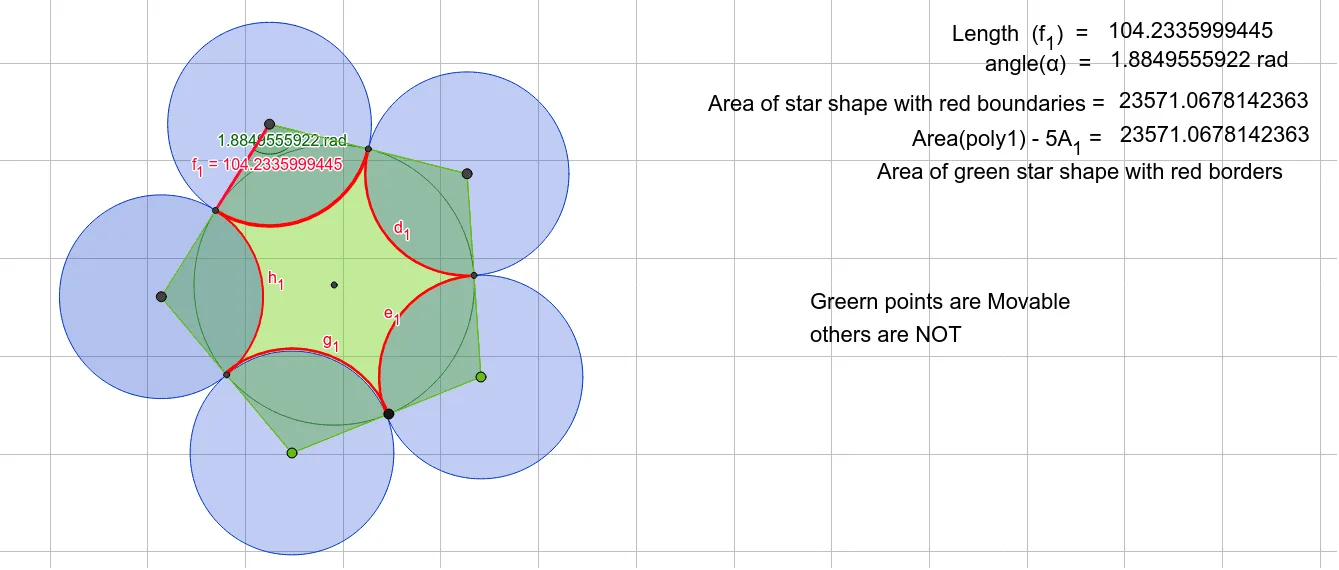
This example demonstrates how to calculate the area of a green star shape with red borders. It involves core mathematical concepts such as polygon area calculation, geometric constructions, and angle/length measurements. Key GeoGebra commands/objects used include Polygon, LineBisector, Intersect, Point, Circle, CircleArc, PointIn, Length, Angle, and Segment. Suitable for high school students and teachers learning geometric constructions and area calculations.
GeoGebra Commands & Parameters
Polygon(A, B, 5) → poly1, f, g, h, i, j, C, D, ELineBisector(E, D) → kLineBisector(D, C) → lLineBisector(C, B) → mLineBisector(B, A) → nLineBisector(E, A) → pIntersect(k, i) → FIntersect(l, h) → GIntersect(m, g) → HLineBisector(f) → qPoint(f) → IIntersect(k, l) → JCircle(J, G) → cCircle(D, G) → dIntersect(c, p, 1) → KCircle(E, K) → eCircle(A, K) → rCircle(C, H) → tCircleArc(D, F, G) → c_1PointIn(c_1) → Pointc1_1Circle(B, H) → sLength(c_1) → bPointIn(c_1) → Pointc1Angle(F, D, G) → aaaSegment(F, D) → f_1CircleArc(C, G, H) → d_1CircleArc(B, H, I) → e_1CircleArc(A, I, K) → g_1CircleArc(E, K, F) → h_1
AI Drawing Prompt Reference
Draw a green star shape with red border lines. The star is made of several equilateral triangles joined together. There is a red circle point at the center. Construct by first drawing the star's vertices, then dividing them with medians to form triangles, and finally connecting the vertices with red lines to outline the star. The red circle marks the center.
The prompt above was compiled from the original drawing commands and is for reference only.