
Area of a Triangle via Geometric Construction
Loading the math board and drawing, please wait…
In collections
Area of a Triangle: Intuitive Discovery
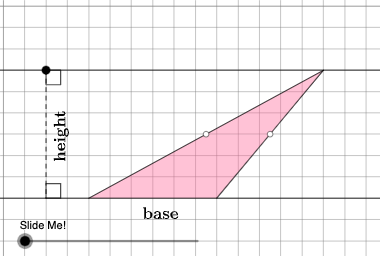
This example demonstrates how to calculate the area of a triangle using geometric construction methods. Key mathematical concepts include triangles, geometric construction, and vectors. It utilizes commands such as Point, Polygon, Dilate, Rotate, and Vector in GeoGebra. Suitable for middle school and above students learning geometric construction and area calculation.
GeoGebra Commands & Parameters
Point(Ray[A, A + (1, 0)]) → BPointIn(d) → CPolygon(A, B, C) → t1, f, a, bOrthogonalLine(C, g) → hIntersect(g, h) → C_{1}Midpoint(C, C_{1}) → DMidpoint(b) → EMidpoint(a) → GDilate(C, If[0 < c ≤ 1, 1 - c, 0], D) → F'Segment(C, F') → iDilate(D, If[1 < c ≤ 2, 2 - c, 0], C_{1}) → D'Segment(D, D') → jRotate(C, If[2 < c ≤ 3, ((c - 2) * pi), pi], D) → F'_{1}Rotate(F', If[2 < c ≤ 3, ((c - 2) * pi), pi], D) → F''Segment(F'_{1}, F'') → i'Dilate(E, If[0 < c ≤ 2, (0.5 * (2 - c)), 0], D) → E'Segment(E, E') → kDilate(G, If[0 < c ≤ 2, (0.5 * (2 - c)), 0], D) → G'Segment(G, G') → lAngle(C, B, A) → βAngle(B, A, C) → γPolygon(A, B, G, E) → q1, a_1, b_1, g_1, ePolygon(G, C, E) → t2, e_1, g_2, f_1Rotate(G, If[4 < c ≤ 5, ((c - 4) * pi), pi], E) → G'_{1}Rotate(C, If[4 < c ≤ 5, ((c - 4) * pi), pi], E) → F'_{2}Rotate(E, If[4 < c ≤ 5, ((c - 4) * pi), pi], E) → E'_{1}Polygon(G'_{1}, F'_{2}, E'_{1}) → t2', e'_{1}, g'_{1}, f'_{2}Segment(A, E) → mSegment(B, G) → nSegment(G, C) → pSegment(C, E) → qSegment(F'_{2}, E) → rSegment(E, G'_{1}) → sSegment(G'_{1}, F'_{2}) → tSegment(G, C) → h_1Segment(C, E) → i_1If(β ≟ pi / 2, 5, 8) → oOrthogonalLine(B, p_1) → j_1Intersect(p_1, j_1) → HOrthogonalLine(G, g) → k_1Intersect(k_1, g) → IDilate(G, If[5 < c ≤ 6, 6 - c, 0], I) → G'_{2}Segment(G, G'_{2}) → l_1Polygon(A, I, G, G'_{1}) → q2, a_2, i_2, g_3, m_1Polygon(I, B, G) → t3, g_4, i_3, b_2Dilate(G, If[7 < c ≤ 8, 8 - c, 0], G'_{1}) → G'_{3}Vector(G, G'_{3}) → uTranslate(I, u) → I'Translate(B, u) → B'Translate(G, u) → G'_{4}Polygon(I', B', G'_{4}) → t3', g'_{4}, n_1, b'Segment(G'_{3}, I') → q_1Segment(G'_{3}, B') → r_1Dilate(B, If[5 < c ≤ 6, 6 - c, 0], H) → H'Polygon(A, B, H, G'_{1}) → q3, a_3, b_3, h_2, t_1Polygon(B, H, G) → t4, g_5, b_4, h_3Translate(B, u) → B'_{1}Translate(H, u) → H'_{1}Translate(G, u) → G'_{5}Polygon(B'_{1}, H'_{1}, G'_{5}) → t4', g'_{5}, b'_{1}, h'_{1}Segment(B'_{1}, G'_{3}) → c_1Segment(B'_{1}, H'_{1}) → d_1Segment(B, H') → s_1Point(Line[A, B]) → FPoint(f_2) → JIntersect(eq1, Line[A, B]) → KSegment(J, K) → j_2Point(Line[A, B]) → LAngle(L, K, J) → αAngle(K, J, C) → δRotateText(text2, pi / 2) → text3
AI Drawing Prompt Reference
Draw a triangle using geometric construction to illustrate area calculation. The figure should include triangle ABC, points D, E, and G, and multiple polygons formed by these points. The construction order is: first determine points B and C, then use midpoint, rotation, and dilation to obtain points D, E, and G. Next, draw triangle ABC and create auxiliary polygons like q1 and t2. Finally, use vectors and transformations to show area calculation relationships.
The prompt above was compiled from the original drawing commands and is for reference only.