
Area of a Rhombus by sciencereimer
Loading the math board and drawing, please wait…
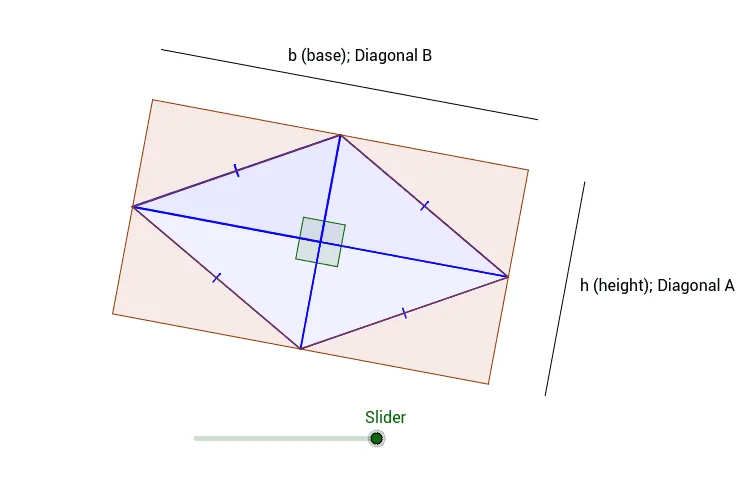
This example demonstrates the calculation of the area of a rhombus. The key mathematical concepts include the rhombus, area formula, and geometric construction. The construction involves using GeoGebra commands such as Point, Segment, and Polygon to create rhombus objects. It is suitable for middle or high school mathematics learning to understand rhombus properties and area calculation.
GeoGebra Commands & Parameters
Point(Circle[A, 4]) → BSegment(A, B) → aPoint(Circle[B, 4]) → CSegment(B, C) → bLine(C, a) → cLine(A, b) → dIntersect(c, d) → DSegment(A, D) → eMidpoint(D, B) → EPolygon(A, D, E) → poly1, e_1, a_1, d_1Polygon(D, C, E) → poly2, e_2, d_2, c_1Polygon(C, B, E) → poly3, e_3, c_2, b_1Polygon(B, A, E) → poly4, e_4, b_2, a_2Angle(D, E, A) → αAngle(A, E, B) → βAngle(B, E, C) → γAngle(C, E, D) → δMidpoint(e_4) → FMidpoint(e_2) → GMidpoint(e_3) → HMidpoint(e_1) → ISegment(F, G) → fPoint(f) → JVector(F, J) → uTranslate(B, u) → B'Translate(A, u) → A'Translate(E, u) → E'Polygon(B', A', E') → poly4', e', b', a'Rotate(B', g, J) → B''Rotate(A', g, J) → A''Rotate(E', g, J) → E''Polygon(B'', A'', E'') → poly4'', e'', b'', a''Rotate(C, g, H) → C'Rotate(B, g, H) → B'_1Rotate(E, g, H) → E'_1Polygon(C', B'_1, E'_1) → poly3', e'_1, c', b'_1Midpoint(e_2) → KRotate(D, g, K) → D'Rotate(C, g, K) → C'_1Rotate(E, g, K) → E'_2Polygon(D', C'_1, E'_2) → poly2', e'_2, d', c'_1Rotate(A, g, I) → A'_1Rotate(D, g, I) → D'_1Rotate(E, g, I) → E'_3Polygon(A'_1, D'_1, E'_3) → poly1', e'_3, a'_1, d'_1Point(Circle[L, 6.96]) → MSegment(L, M) → iLine(N, c') → hPoint(Circle[N, 3.96]) → OSegment(N, O) → j
AI Drawing Prompt Reference
Draw a rhombus and calculate its area. Start by drawing a circle with center A and radius 4 to get point B, then draw a circle with center B and radius 4 to get point C. Connect AB, BC, CD, and DA to form the rhombus. Next, draw the diagonals AC and BD, intersecting at point E, and use E as the midpoint to connect AE, BE, CE, and DE, forming four triangles. Through rotation and midpoint construction, the area of the rhombus can be determined.
The prompt above was compiled from the original drawing commands and is for reference only.