
Area Between Functions
Loading the math board and drawing, please wait…
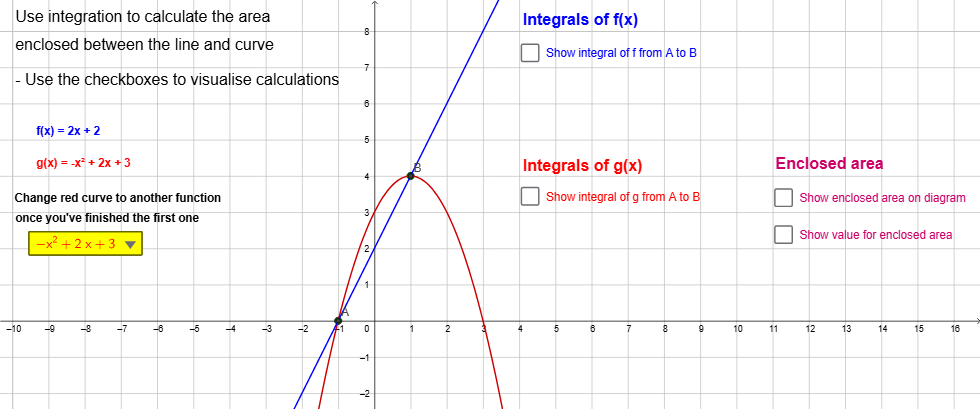
This example demonstrates how to calculate the area between two functions using GeoGebra. Key mathematical concepts include functions, integrals, and area. Commands such as SelectedElement, Integral, and IntegralBetween are used to construct the area between the functions. Suitable for high school and above students learning calculus and function-related knowledge.
GeoGebra Commands & Parameters
SelectedElement(DropDownList) → gIntegral(g, x(A), x(B)) → CurveABIntegral(f, x(A), x(B)) → LineABIntegralBetween(f, g, x(A), x(B)) → TotalAreaIntegral(abs(f(x) - g(x)), x(A), x(B)) → TotalSolutionIntegral(g, x(A), x(C)) → CurveACIntegral(g, x(C), x(B)) → CurveCBIntegral(f, x(A), x(C)) → LineACIntegral(f, x(C), x(B)) → LineCBText(("f(x) = " * f)) → text1Text(("g(x) = " * g)) → text2Text("Integrals of f(x)") → text4Text("Integrals of g(x)") → text5Text(LineAB) → text6Text(LineAC) → text7Text(LineCB) → text8Text(CurveAB) → text9Text(CurveAC) → text10Text(CurveCB) → text11Text("Enclosed area" = TotalSolution) → text12Text("Enclosed area") → text13Text("Use integration to calculate the area") → text14Text("enclosed between the line and curve") → text15Text("Change red curve to another function") → text3Text("once you've finished the first one") → text16Text("- Use the checkboxes to visualise calculations") → text20