
Area Between Curves: dx
Loading the math board and drawing, please wait…
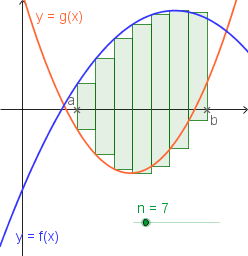
This example demonstrates how to calculate the area between two curves using GeoGebra, focusing on integral concepts, function graphs, and interval summation. Key GeoGebra commands and objects used include Point, Sequence, Sum, and elements like g, B, A, f, n, a, b, h, L1, L2, LeftP, LeftSum for constructing the visualization. Ideal for high school and above students learning applications of definite integrals in calculus.
GeoGebra Commands & Parameters
Point(xAxis) → BPoint(xAxis) → ASequence((i, f(i)), i, a, b, h) → L1Sequence((i, g(i)), i, a, b, h) → L2Sequence(Polygon[Element[L1, i], (x(Element[L1, i + 1]), y(Element[L1, i])), (x(Element[L2, i + 1]), y(Element[L2, i])), Element[L2, i]], i, 1, n) → LeftPSum(LeftP) → LeftSum