
Arc Length in Polar Coordinates by Tim Brzezinski
Loading the math board and drawing, please wait…
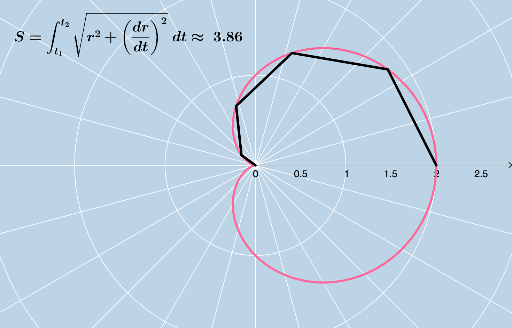
This example demonstrates how to calculate the length of an arc of a polar function between two t-values. It involves core mathematical concepts like polar coordinates, the arc length formula from calculus, and numerical approximation. Key GeoGebra commands and objects used include CurveCartesian, Sequence, Textfield, FractionText, Sum, and elements like r, a, tmin, tmax, n, b, various lists, input boxes, and text objects. Suitable for high school and above students learning about arc length in polar functions, or for calculus instruction.
GeoGebra Commands & Parameters
CurveCartesian((r(t) * cos(t)), (r(t) * sin(t)), t, 0, 6.283185307179586) → aSequence(a(i), i, tmin, tmax, b) → list1Sequence(Segment[(0, 0), Element[list1, i]], i, 0, n) → list2Sequence(Polygon[(0, 0), Element[list1, i], Element[list1, i + 1]], i, 1, n) → list3Textfield(tmin) → InputBox1Textfield(tmax) → InputBox2Textfield(n) → InputBox3Sequence(Segment[(0, 0), Element[list1, i]], i, 1, n) → list4FractionText(tmin / π) → text2FractionText(tmax / π) → text3Sum(list3, n) → cFractionText(d) → text5CurveCartesian((s(t) * cos(t)), (s(t) * sin(t)), t, 0, 6.283185307179586) → eTextfield(s) → InputBox5Sequence(e(i), i, tmin, tmax, b) → list5Sequence(Segment[Element[list5, i], Element[list5, i + 1]], i, 1, n, 1) → list6Sum(list6) → f