
Animation Demonstrating Geometric Transformations and Optimization (1)
Loading the math board and drawing, please wait…
In collections
Congruence (CO) Cluster
Congruence (Vol 1)
Geometry Review
Congruence (Vol 1) Over 80 Resources
Geometry (Congruence) Volume 1
CCSS High School: Geometry (Congruence) Volume 1 S N ATTAR
CCSS High School: Geometry (Congruence) Volume 1
CCSS High School: Geometry (Congruence) Volume 1
CCSS High School: Geometry (Congruence) Volume 1
CCSS High School: Geometry (Congruence) Volume 1
CCSS High School: Geometry (Congruence) Volume 1
CCSS High School: Geometry (Congruence) Volume 1
CCSS High School: Geometry (Congruence) Volume 1
CCSS High School: Geometry (Congruence) Volume 1
CCSS High School: Geometry (Congruence) Volume 1
CCSS High School: Geometry (Congruence) Volume 1
CCSS High School: Geometry (Congruence) Volume 1
Unit 5: Triangle Congruence
Triangle Congruence Theorems 1
Triangle Congruence Book 1
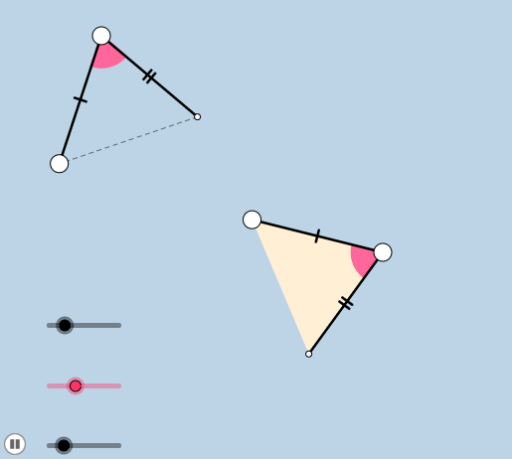
This example demonstrates geometric transformations and optimization processes through animation. It involves core mathematical concepts such as coordinate geometry, transformations, and optimization. Key GeoGebra commands and objects used include Circle, Point, Segment, Rotate, Angle, Ray, Intersect, Min, Polygon, CircleSector, Mirror, Line, Dilate, Vector, and Translate. Suitable for high school students and math enthusiasts studying geometric transformations and optimization methods.
GeoGebra Commands & Parameters
Circle(A, a) → cPoint(c) → BSegment(A, B) → fCircle(A, b) → dRotate(B, α, A) → B'Angle(B, A, B') → βRay(A, B') → gIntersect(d, g, 1) → CSegment(B, C) → hSegment(A, C) → iMin(f, i) → eCircle(A, (0.25 * e)) → kIntersect(k, f) → D,Intersect(k, i) → E,Polygon(A, B, C) → poly1, c_1, a_1, b_1CircleSector(A, D, E) → pMirror(A, h) → A'Mirror(B, h) → B'_1Mirror(C, h) → C'Polygon(A', B'_1, C') → poly1', c', a', b'_1Mirror(p, h) → p'Mirror(A, h) → A'_1Mirror(B, h) → B'_2Segment(A'_1, B'_2) → f'Mirror(A, h) → A'_2Mirror(C, h) → C'_1Segment(A'_2, C'_1) → i'Line(C, B) → jPoint(j) → GPoint(j) → HRay(B, H) → lRay(C, G) → mCircle(F, a) → qPoint(q) → ISegment(F, I) → nRotate(I, α, F) → I'Angle(I, F, I') → γCircle(F, b) → rRay(F, I') → sIntersect(r, s, 1) → JSegment(I, J) → tSegment(F, J) → f_1Dilate(B, If[0 < u ≤ 1, 1 - u, 0], I) → B'_3Vector(B, B'_3) → vTranslate(A, v) → A'_3Translate(B, v) → B'_4Segment(A'_3, B'_4) → f'_1Line(B, n) → g_1Point(g_1) → KAngle(K, B, A) → δRotate(A'_3, If[1 < u ≤ 2, ((-(u - 1)) * δ), (-δ)], I) → LRotate(B'_4, If[1 < u ≤ 2, ((-(u - 1)) * δ), (-δ)], I) → MSegment(L, M) → h_1Dilate(A, If[2 < u ≤ 3, 3 - u, 0], F) → A'_4Vector(A, A'_4) → wTranslate(A, w) → A'_5Translate(C, w) → C'_2Segment(A'_5, C'_2) → i'_1Line(A, f_1) → i_1Point(i_1) → NAngle(N, A, C) → εRotate(A'_5, If[3 < u ≤ 4, ((-(u - 3)) * ε), (-ε)], F) → ORotate(C'_2, If[3 < u ≤ 4, ((-(u - 3)) * ε), (-ε)], F) → PSegment(O, P) → j_1Translate(p, w) → p'_1Rotate(p'_1, If[3 < u ≤ 4, ((-(u - 3)) * ε), (-ε)], F) → d_1Dilate(B, If[4 < u ≤ 5, 5 - u, 0], I) → B'_5Vector(B, B'_5) → u_1Translate(A, u_1) → A'_6Translate(B, u_1) → B'_6Translate(C, u_1) → C'_3Polygon(A'_6, B'_6, C'_3) → poly1'_1, c'_3, a'_6, b'_6Line(B, t) → k_1Point(k_1) → QAngle(Q, B, C) → ζRotate(A'_6, If[5 < u ≤ 6, ((-(u - 5)) * ε), (-ε)], I) → RRotate(B'_6, If[5 < u ≤ 6, ((-(u - 5)) * ε), (-ε)], I) → SRotate(C'_3, If[5 < u ≤ 6, ((-(u - 5)) * ε), (-ε)], I) → TPolygon(R, S, T) → poly2, t_1, r_1, s_1Segment(B, A) → l_1Segment(A, C) → m_1Segment(C, B) → n_1CircleSector(A, D, E) → e_1
AI Drawing Prompt Reference
Create an animated geometric diagram: start with a point as center and draw two concentric circles. Pick a point on the larger circle, connect it to the center to form a radius, then rotate this radius around the center by an angle to get a new ray. This ray intersects the smaller circle; connect that intersection to the rotated point and the center to form a triangle. Inside the triangle, draw a circular sector with the center as vertex, bounded by the perpendiculars from the center to the triangle's sides. Then reflect the entire triangle and sector across one side of the triangle to create a mirrored copy. Next, repeat a similar construction at another location but using a scaling transformation and add a vector translation to show how the shape changes under translation and scaling. Finally, place two points on a line, draw rays from them, and add a circle with a point on it, rotating and scaling that point to complete the animated demonstration.
The prompt above was compiled from the original drawing commands and is for reference only.