
Open Middle: Maximizing & Minimizing Area
Loading the math board and drawing, please wait…
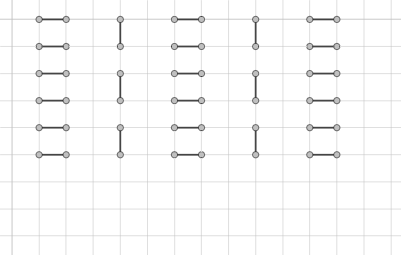
This example demonstrates the dynamic adjustment of rectangle sides to observe area changes, exploring maximum and minimum values. Core math concepts include area, perimeter, polygons, rectangles, trigonometric functions, vectors, logic, differential equations, and angles. Constructed using GeoGebra commands like Point and Segment, involving objects A, B, f, C, D, g, E, F, h, G, H, i, I, J, j, K, L, k, M, N, l, O, P, m, Q, R, n, S, T, p, U, V, q, W, Z, r, A_1, B_1, s, C_1. Suitable for high school mathematics teaching, inspiring students to think about function extrema and geometric optimization problems.
GeoGebra Commands & Parameters
Point(Circle[A, 1]) → BSegment(A, B) → fPoint(Circle[C, 1]) → DSegment(C, D) → gPoint(Circle[E, 1]) → FSegment(E, F) → hPoint(Circle[G, 1]) → HSegment(G, H) → iPoint(Circle[I, 1]) → JSegment(I, J) → jPoint(Circle[K, 1]) → LSegment(K, L) → kPoint(Circle[M, 1]) → NSegment(M, N) → lPoint(Circle[O, 1]) → PSegment(O, P) → mPoint(Circle[Q, 1]) → RSegment(Q, R) → nPoint(Circle[S, 1]) → TSegment(S, T) → pPoint(Circle[U, 1]) → VSegment(U, V) → qPoint(Circle[W, 1]) → ZSegment(W, Z) → rPoint(Circle[A_1, 1]) → B_1Segment(A_1, B_1) → sPoint(Circle[C_1, 1]) → D_1Segment(C_1, D_1) → tPoint(Circle[E_1, 1]) → F_1Segment(E_1, F_1) → aPoint(Circle[G_1, 1]) → H_1Segment(G_1, H_1) → bPoint(Circle[I_1, 1]) → J_1Segment(I_1, J_1) → cPoint(Circle[K_1, 1]) → L_1Segment(K_1, L_1) → dPoint(Circle[M_1, 1]) → N_1Segment(M_1, N_1) → ePoint(Circle[O_1, 1]) → P_1Segment(O_1, P_1) → f_1Point(Circle[Q_1, 1]) → R_1Segment(Q_1, R_1) → g_1Point(Circle[S_1, 1]) → T_1Segment(S_1, T_1) → h_1Point(Circle[U_1, 1]) → V_1Segment(U_1, V_1) → i_1Point(Circle[W_1, 1]) → Z_1Segment(W_1, Z_1) → j_1
AI Drawing Prompt Reference
On the same coordinate plane, draw several groups of segments defined by points on circles of radius 1. Start with a point A and place B on the circle centered at A with radius 1, then draw segment f from A to B. Repeat the same idea for circle centers C, E, G, I, K, M, O, Q, S, U, and W: for each center, choose a point on its radius-1 circle (D, F, H, J, L, N, P, R, T, V, and Z respectively) and connect each center to its corresponding point to form the segments g, h, i, j, k, l, m, n, p, q, and r. Then duplicate this construction in the same style using the centers A_1, C_1, E_1, G_1, I_1, K_1, M_1, O_1, Q_1, S_1, U_1, and W_1, with circle points B_1, D_1, F_1, H_1, J_1, L_1, N_1, P_1, R_1, T_1, V_1, and Z_1 connected to generate segments s, t, a, b, c, d, e, f_1, g_1, h_1, i_1, and j_1, forming a unified geometric setup for studying changing rectangle sides and area extremes.
The prompt above was compiled from the original drawing commands and is for reference only.