
Animation Demonstrating Geometric Transformations and Loci
Loading the math board and drawing, please wait…
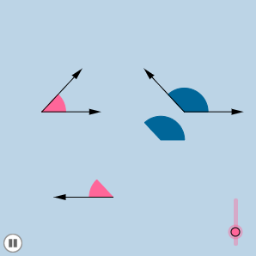
This example demonstrates geometric transformations and loci through animations involving shapes like circles and trapezoids. It covers core mathematical concepts including angles, circles, polygons, coordinate geometry, limits, and geometric constructions. The construction utilizes commands and objects such as Circle, Segment, Point, Ray, Midpoint, OrthogonalLine, Intersect, Rotate, Angle, Vector, CircleSector, Dilate, and Translate. It is suitable for high school and above students to understand geometric transformations, loci, and applications of advanced mathematical concepts.
GeoGebra Commands & Parameters
Circle(A, B) → cSegment(A, B) → aPoint(b) → CRay(A, C) → dPoint(d) → DCircle(D, a) → eMidpoint(A, D) → EOrthogonalLine(E, b) → fPoint(f) → FRay(E, F) → gPoint(g) → GIntersect(c, b) → H, IIntersect(e, b) → J, KRotate(I, α, A) → I'Angle(I, A, I') → βRotate(K, π - β, D) → K'Angle(K, D, K') → γCircle(A, (0.4 * a)) → hCircle(D, (0.4 * a)) → kSegment(A, I') → iSegment(D, K') → jIntersect(h, b, 2) → LIntersect(h, i, 1) → MIntersect(k, b, 2) → NIntersect(k, j, 1) → OCircle(G, a) → pIntersect(p, l, 2) → PIntersect(p, l, 1) → QIntersect(p, g, 1) → RVector(G, P) → uCircleSector(A, L, M) → qCircleSector(D, N, O) → rDilate(A, If[0 < m ≤ 1, 1 - m, 0], G) → A'Vector(A, A') → wTranslate(q, w) → q'Dilate(D, If[2 < m ≤ 3, 3 - m, 0], G) → D'Vector(D, D') → nTranslate(r, n) → r'Vector(G, Q) → sVector(A, I') → u_1Vector(A, I) → tVector(D, K) → v_1Vector(D, K') → w_1Rotate(q', If[1 < m ≤ 2, ((m - 1) * (π - α)), π - α], G) → q''
AI Drawing Prompt Reference
Create an animated geometric diagram showing transformations and loci. Start with a fixed segment as radius for two circles, with a moving point on one circle. From this point, draw a ray and place another point on it, then construct a third circle centered at that point with the same radius. Construct midpoints and perpendicular lines, place points on them, and draw rays intersecting the circles at multiple points. Use rotations, translations, and dilations to animate circular sectors and loci, with vectors indicating motion. The scene includes circles, polygons, angles, and dynamic loci.
The prompt above was compiled from the original drawing commands and is for reference only.