
Animation Demonstrating Geometric Transformations and Integrals
Loading the math board and drawing, please wait…
In collections
Congruence (CO) Cluster
Congruence (Vol 2)
CCSS High School: Geometry (Congruence) Volume 2
CCSS High School: Geometry (Congruence) Volume 2
CCSS High School: Geometry (Congruence) Volume 2
Geometry (Congruence) Volume 2
CCSS High School: Geometry (Congruence) Volume 2
CCSS High School: Geometry (Congruence) Volume 2
CCSS High School: Geometry (Congruence) Volume 2
CCSS High School: Geometry (Congruence) Volume 2
CCSS High School: Geometry (Congruence) Volume 2
CCSS High School: Geometry (Congruence) Volume 2
CCSS High School: Geometry (Congruence) Volume 2
Gail LeBlancCCSS High School: Geometry (Congruence) Volume 2
CCSS High School: Geometry (Congruence) Volume 2
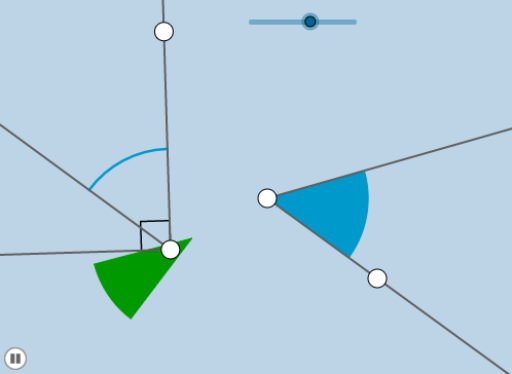
This example demonstrates geometric transformations and integral calculations through animation, involving core concepts like angles, centroid, indefinite integral, plane figures, curve sketching, and linear functions. It utilizes commands such as Ray, Rotate, Angle, Circle, Line, Intersect, LaTeX, CircleSector, Dilate, Vector, Translate, Point, CircleArc, and OrthogonalLine in GeoGebra for construction. Suitable for high school and above students to learn geometric transformations and integral computations.
GeoGebra Commands & Parameters
Ray(A, B) → fRotate(B, α, A) → B'Angle(B, A, B') → βRay(A, B') → gCircle(A, 1) → cLine(B, A) → hIntersect(c, h, 2) → CRay(A, C) → iRay(D, E) → jRotate(E, α, D) → E'Angle(E, D, E') → γRay(D, E') → kLine(E, D) → lCircle(D, 1) → dIntersect(d, l, 2) → FRay(D, F) → mLaTeX(B', true, true) → text1Circle(D, 2) → eIntersect(e, j, 1) → GIntersect(e, k, 1) → HLine(D, i) → nCircleSector(D, G, H) → pDilate(D, If[0 < a ≤ 1, 1 - a, 0], A) → D'Vector(D, D') → uTranslate(p, u) → p'Point(n) → IAngle(I, D, E') → δLine(D, g) → qIntersect(e, q, 2) → JAngle(H, D, J) → εRotate(p', If[0 < a ≤ 1, (a * ε), ε], D') → p''CircleArc(D, G, H) → rIntersect(e, m) → K,Dilate(D, If[2.75 < a ≤ 3.75, 3.75 - a, 0], A) → D'_1Vector(D, D'_1) → vOrthogonalLine(A, f) → bOrthogonalLine(D, j) → f_1Intersect(e, f_1) → L, MAngle(G, D, M) → ζRay(D, M) → sLine(D, b) → g_1Intersect(d, g_1, 2) → NAngle(M, D, N) → ηCircleSector(D, H, M) → c_1Dilate(D, If[2.25 < a ≤ 3.25, 3.25 - a, 0], A) → D'_2Vector(D, D'_2) → wTranslate(c_1, w) → d_1Rotate(d_1, If[2.25 < a ≤ 3.25, ((a - 2.25) * η), η], D'_2) → e_1Point(b) → OAngle(B, A, O) → θCircleArc(D, H, M) → h_1Circle(A, 5) → k_1Intersect(k_1, b, 2) → QRay(A, Q) → i_1
AI Drawing Prompt Reference
Create an animated geometric transformation and integral calculation demonstration. Include rotating rays, angles, circles, and lines with their intersections to show the transformation process. Construct multiple geometric elements through rotation and scaling, using arcs and sectors to represent integral areas. The final image should feature interconnected geometric objects dynamically illustrating the relationship between transformations and integrals, suitable for learning geometric transformations and integral computations.
The prompt above was compiled from the original drawing commands and is for reference only.