
Animation 76: Circle and Transformations
Loading the math board and drawing, please wait…
In collections
Geometry Review
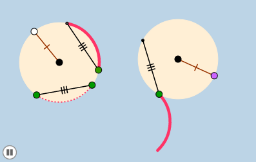
This example demonstrates a circle and its transformation process. Key mathematical concepts include circle, geometric transformations, and complex numbers. Using GeoGebra commands such as Circle, Rotate, and Dilate, it illustrates the rotation and scaling transformations of a circle. Suitable for high school mathematics education and learning, particularly in coordinate geometry and solid geometry.
GeoGebra Commands & Parameters
Circle(A, B) → cPoint(c) → CSegment(A, B) → aCircle(D, a) → dPoint(d) → EPoint(c) → FSegment(F, C) → bPoint(c) → GCircle(G, b) → eIntersect(c, e, 1) → HSegment(G, H) → fCircle(E, b) → gIntersect(d, g, 2) → ISegment(E, I) → hAngle(F, A, C) → αRotate(F, If[0 < i ≤ 1, (i * α), α], A) → F'CircleArc(A, F, F') → kAngle(G, A, F) → βSegment(E, I) → jRotate(k, If[1.5 < i ≤ 2.5, ((-(i - 1.5)) * β), (-β)], A) → k'CircleArc(A, F, C) → pDilate(H, If[2.6 < i ≤ 3.6, 3.6 - i, 0], E) → H'Vector(H, H') → uTranslate(k', u) → k''Line(E, f) → lPoint(l) → JAngle(I, E, J) → γRotate(k'', If[3.6 < i ≤ 4.6, ((-(i - 3.6)) * (γ + 180°)), (-(γ + 180°))], E) → k'''Segment(A, B) → mPoint(d) → KSegment(D, K) → n
AI Drawing Prompt Reference
Draw a circle, then rotate and scale it to generate a series of new circles and segments. First, draw a circle c, then generate point C, line segment a, and circle d. Next, generate point E and F on d, then generate circle e and line segment b. Find the intersection point H of circle c and e, generate line segment f. Draw circle g, find its intersection point I with d, and generate line segment h. Calculate angle α, then rotate point F around point A to generate F', and draw arc k. Calculate angle β, generate line segment j, rotate arc k around point A to generate k', then scale point H to generate H', generate vector u, rotate arc k' around point E to generate k'', and finally draw line l and generate point J from it, calculate angle γ, and rotate arc k'' around point E to generate k'''.
The prompt above was compiled from the original drawing commands and is for reference only.