
Animation 73: Geometric Transformations and Function Demonstrations
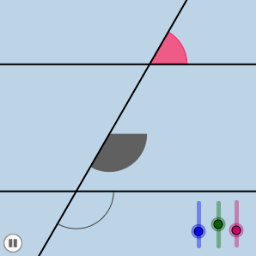
Loading the math board and drawing, please wait…
In collections
Congruence (CO) Cluster
Congruence (Vol 2)
CCSS High School: Geometry (Congruence) Volume 2
CCSS High School: Geometry (Congruence) Volume 2
CCSS High School: Geometry (Congruence) Volume 2
Geometry (Congruence) Volume 2
CCSS High School: Geometry (Congruence) Volume 2
CCSS High School: Geometry (Congruence) Volume 2
CCSS High School: Geometry (Congruence) Volume 2
CCSS High School: Geometry (Congruence) Volume 2
CCSS High School: Geometry (Congruence) Volume 2
CCSS High School: Geometry (Congruence) Volume 2
CCSS High School: Geometry (Congruence) Volume 2
Gail LeBlancCCSS High School: Geometry (Congruence) Volume 2
CCSS High School: Geometry (Congruence) Volume 2
Parallel Lines and Planes
This GeoGebra example demonstrates a dynamic animation of geometric constructions and transformations, showcasing the motion of points, lines, and circles under operations like rotation, translation, and dilation. It highlights key mathematical concepts such as angle measurement, straight line equations, the graphical characteristics of exponential and polynomial functions, coordinate-based geometric representations, and the application of LCM and GCD in geometric contexts (e.g., periodic patterns), while illustrating continuity in a visual manner. The construction utilizes commands including Point, Rotate, Angle, Line, Circle, Intersect, CircleSector, Dilate, Vector, Translate, and CircleArc, generating objects like points A, B, C, and parameters (m, α, β, etc.) to create interactive geometric relationships. It is suitable for high school or college-level mathematics education, particularly in geometry, function, or coordinate geometry courses, aiding students in visualizing abstract concepts through spatial demonstrations.
GeoGebra Commands & Parameters
Point(a) → BRotate(B, α, A) → B'Angle(B, A, B') → βLine(A, B') → bCircle(A, 1) → eIntersect(b, d) → CCircle(C, 1) → fIntersect(e, a) → D, EIntersect(e, b) → F, GIntersect(f, b) → H, IIntersect(f, d) → J, KCircleSector(C, K, I) → gCircleSector(C, I, J) → hCircleSector(C, J, H) → kCircleSector(C, H, K) → pCircleSector(A, D, F) → sCircleSector(A, F, E) → tDilate(A, If[0 < i < 1, 1 - i], C) → A'Vector(A, A') → uTranslate(s, u) → s'Translate(t, u) → t'CircleArc(C, K, I) → d_1CircleArc(C, I, J) → e_1CircleArc(A, D, F) → g_1CircleArc(A, F, E) → k_1
AI Drawing Prompt Reference
Create a dynamic geometric diagram showing a point rotating around a fixed center, with an adjustable angle. Draw a unit circle centered at a point on the rotating ray, intersecting a fixed line. From these intersections, construct four circular sectors on the unit circle, and another set of sectors on a circle centered at the fixed point. Then translate one set of sectors along a vector between two points, creating a shifted copy. Include visible angle measures, intersection points, and the original versus translated shapes to illustrate geometric transformations and continuity.
The prompt above was compiled from the original drawing commands and is for reference only.