
Animation 257: Comprehensive Dynamic Demo of Geometry and Matrix Transformations
Loading the math board and drawing, please wait…
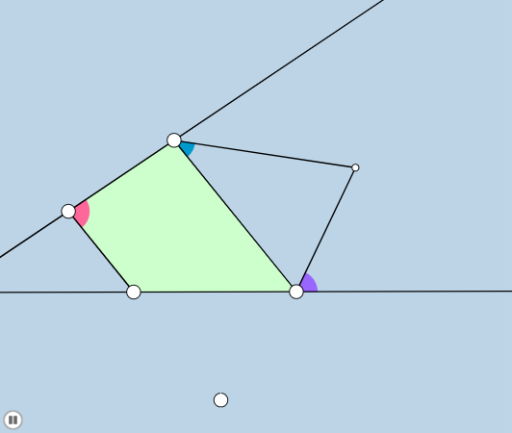
This example is a comprehensive dynamic geometry demonstration that uses sliders to drive continuous changes in multiple geometric objects (points, lines, circles, polygons), showcasing the combination of geometric transformations and algebraic tools. Core mathematical concepts include trapezoid properties, matrix transformations (such as scaling, rotation, translation), orthocenter, logarithmic function graphs, standard deviation, and scatter plots, reflecting the fusion of multi-domain mathematical knowledge. Construction highlights: using GeoGebra commands such as Line, Ray, Point, Segment, Slope, Circle, Intersect, Angle, Dilate, Vector, Translate, Polygon, Rotate, OrthogonalLine, and CircleArc, it builds a complex figure involving points A, B, C, D, E, F, G, H, K, as well as circles, arcs, and polygons; sliders control parameters to achieve dynamic animation. Suitable for high school and above students to explore geometric transformations, matrix applications, and statistical concepts intuitively, and also serves as a reference for teachers creating interactive math courseware.
GeoGebra Commands & Parameters
Line(A, B) → fRay(A, B) → gPoint(g) → CRay(A, C) → hSegment(A, C) → iSlope(f) → mPointIn(a) → DSegment(A, D) → jLine(D, i) → kPoint(k) → ERay(D, E) → lPoint(l) → FRay(D, F) → nSegment(F, C) → pSegment(D, F) → qMin(j, i) → cCircle(A, (0.2 * c)) → dIntersect(d, j, 1) → GIntersect(d, i, 1) → HCircleSector(A, H, G) → eAngle(C, A, D) → αCircleSector(A, G, H) → rDilate(A, If[0 < o ≤ 1, 1 - o, 0], C) → A'Segment(A, A') → sDilate(F, If[0 < o ≤ 1, 1 - o, 0], D) → F'Segment(F, F') → tDilate(A, If[1 < o ≤ 2, 2 - o, 0], D) → A'_1Segment(A, A'_1) → f_1Ray(A, D) → g_1Point(g_1) → KDilate(A, If[2 < o ≤ 3, 3 - o, 0], D) → A'_2Vector(A, A'_2) → uTranslate(e, u) → e'Polygon(A, C, F, D) → poly1, a_1, c_1, f_2, d_1Translate(r, u) → r'Dilate(C, If[1 < o ≤ 2, 2 - o, 0], F) → C'_3Segment(C, C'_3) → i_1Line(C, F) → j_1Line(A, D) → k_1Segment(A, F) → h_1Segment(D, C) → l_1Intersect(h_1, l_1) → IPoint(k_1) → JAngle(F, D, J) → βPoint(j_1) → LAngle(L, F, D) → γRotate(J, (-(β / 2)), D) → J'Angle(J', D, J) → εRay(D, J') → m_1Rotate(L, γ / 2, F) → L'Angle(L, F, L') → δRay(F, L') → n_1Intersect(m_1, n_1) → MOrthogonalLine(M, j_1) → p_1OrthogonalLine(M, t) → q_1OrthogonalLine(M, k_1) → r_1Intersect(j_1, p_1) → NIntersect(q_1, t) → OIntersect(r_1, k_1) → PCircle(M, N) → e_1Point(k_1) → QPoint(j_1) → RAngle(Q, A, C) → ζAngle(A, C, R) → κ_1Rotate(Q, ζ / 2, A) → Q'Angle(Q, A, Q') → θRotate(R, (-(κ_1 / 2)), C) → R'Angle(R', C, R) → ηRay(C, R') → s_1Ray(A, Q') → t_1Intersect(s_1, t_1) → SOrthogonalLine(S, j_1) → b_1OrthogonalLine(S, k_1) → g_2OrthogonalLine(S, s) → h_2Intersect(j_1, b_1) → TIntersect(h_2, s) → UIntersect(g_2, k_1) → VCircle(S, T) → c_2Segment(O, U) → i_2Intersect(j_1, k_1) → WDilate(D, If[3 < o ≤ 4, 4 - o, 0], M) → D'Dilate(F, If[3 < o ≤ 4, 4 - o, 0], M) → F'_1Segment(D, D') → j_2Segment(F, F'_1) → k_2Circle(D, Radius[d]) → d_2Circle(F, Radius[d]) → e_2Intersect(e_2, n_1) → Z,Intersect(d_2, m_1) → B_1,Intersect(d_2, t) → C_1,CircleSector(D, C_1, B_1) → q_2Intersect(e_2, j_1) → D_1, E_1CircleSector(F, E_1, Z) → p_2Rotate(p_2, If[4.5 < o ≤ 5.5, ((o - 4.5) * δ), δ], F) → r_2Rotate(q_2, If[5.5 < o ≤ 6.5, ((o - 5.5) * ε), ε], D) → s_2Circle(C, Radius[d]) → t_2Intersect(d, t_1) → F_1,Intersect(d, s) → G_1,Intersect(t_2, s_1, 1) → A_1Intersect(t_2, s) → H_1,CircleSector(A, F_1, G_1) → c_3CircleSector(C, H_1, A_1) → d_3Angle(F_1, A, G_1) → κAngle(H_1, C, A_1) → λDilate(A, If[6.5 < o ≤ 7.5, 7.5 - o, 0], S) → A'_3Dilate(C, If[6.5 < o ≤ 7.5, 7.5 - o, 0], S) → C'Segment(A, A'_3) → l_2Segment(C, C') → m_2Rotate(c_3, If[8 < o ≤ 9, ((-(o - 8)) * κ), (-κ)], A) → e_3Rotate(d_3, If[9 < o ≤ 10, ((o - 9) * λ), λ], C) → f_3Dilate(S, If[10 < o ≤ 11, 11 - o, 0], U) → S'Dilate(M, If[10 < o ≤ 11, 11 - o, 0], O) → M'Segment(S, S') → n_2Segment(M, M') → a_2Angle(M, O, D) → ιAngle(A, U, S) → μRotate(O, If[11 < o ≤ 13, ((o - 11) * π), (2 * π)], M) → O'Rotate(U, If[11 < o ≤ 13, ((o - 11) * π), (2 * π)], S) → U'CircleArc(M, O, O') → g_3CircleArc(S, U, U') → h_3Dilate(A, If[13 < o ≤ 14, 14 - o, 0], F) → A'_4Segment(A, A'_4) → b_2Dilate(C, If[14 < o ≤ 15, 15 - o, 0], I) → C'_1Segment(C, C'_1) → i_3Dilate(I, If[15 < o ≤ 16, 16 - o, 0], D) → I'Segment(I, I') → j_3Dilate(U, If[16.5 < o ≤ 17.5, 17.5 - o, 0], I) → U'_1Segment(U, U'_1) → k_3Dilate(I, If[17.5 < o ≤ 18.5, 18.5 - o, 0], O) → I'_1Segment(I, I'_1) → l_3
AI Drawing Prompt Reference
Create a dynamic geometry figure with a line and a ray, placing a point on the ray to form segments. Add another point and construct multiple rays and segments to outline a quadrilateral. Draw a small circle centered at a point, intersecting segments at two points, and connect them with an arc. Use sliders to control scaling, translation, and rotation of points and shapes, displaying angles. Finally, draw diagonals, mark their intersection, and construct triangles with labeled angles, integrating geometric transformations and statistical ideas.
The prompt above was compiled from the original drawing commands and is for reference only.