
Animation 102
Loading the math board and drawing, please wait…
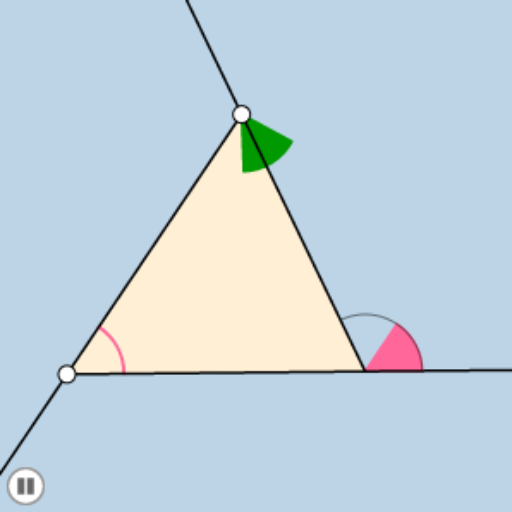
This example demonstrates dynamic transformations of triangles and functions. Key mathematical concepts include triangles, functions, and vectors. Using GeoGebra commands such as Line, Slope, PointIn, etc., a dynamic triangle and function graph are constructed. Suitable for high school mathematics education and learning.
GeoGebra Commands & Parameters
Line(A, B) → fSlope(f) → aPointIn(c) → CSegment(A, C) → gSegment(C, B) → hSegment(B, A) → iMin(list1) → dCircle(A, (0.2 * d)) → eCircle(B, (0.2 * d)) → kCircle(C, (0.2 * d)) → pRay(A, B) → jRay(B, C) → lRay(C, A) → mPoint(j) → DPoint(l) → EPoint(m) → FRay(B, D) → nRay(C, E) → qRay(A, F) → rIntersect(p, g, 1) → GIntersect(p, h, 1) → HIntersect(e, i, 1) → IIntersect(e, g, 1) → JCircleSector(A, I, J) → sCircleSector(C, G, H) → tPolygon(A, B, C) → poly1, c_1, a_1, b_1Dilate(A, If[0 < o ≤ 1, 1 - o, 0], B) → A'Vector(A, A') → uTranslate(s, u) → s'CircleArc(A, I, J) → d_1Distance(A, I) → vRotate(t, If[1 < o ≤ 2, ((o - 1) * π), π], C) → t'CircleArc(C, G, H) → e_1Angle(G, C, H) → αDilate(C, If[2 < o ≤ 3, 3 - o, 0], B) → C'Vector(C, C') → u_1Translate(t', u_1) → t''Intersect(k, n) → K,Intersect(k, h) → L,CircleArc(B, K, L) → f_1
AI Drawing Prompt Reference
Draw a dynamic triangle with three movable vertices, showing its sides and the slope of one side. Place a point inside the triangle and connect it to the vertices to form inner segments. Construct three equal circles centered at the vertices with radius equal to one-fifth of the triangle's shortest side. From each vertex, draw a ray along the opposite side and pick points on these rays, then connect these points to form new rays. The circles intersect the sides, creating arcs and sectors. Use a slider to animate the vertices moving along the sides, causing the sectors and arcs to translate or rotate, demonstrating dynamic transformations.
The prompt above was compiled from the original drawing commands and is for reference only.