
Least squares error in geometry and algebra
Loading the math board and drawing, please wait…
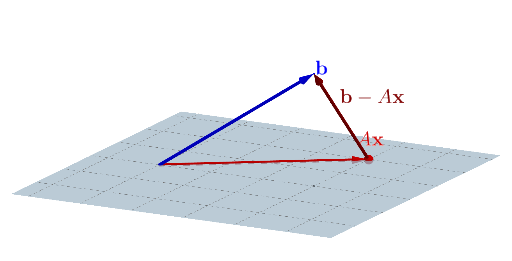
This example demonstrates the application of least squares error in geometric figures. Key mathematical concepts include linear regression, minimization of error squares, and coordinate geometry. Construction involves GeoGebra commands such as Intersect, PointIn, Vector, Angle, etc. Suitable for high school students or college undergraduates learning the integration of geometry and algebra.
GeoGebra Commands & Parameters
Intersect(xAxis, zAxis) → APointIn(xOyPlane) → BVector(A, B) → uVector(A, C) → vVector(A, D) → wVector(C, D) → aAngle(D, C, A) → αVector(B, D) → bSegment(B, D) → fSegment(C, D) → gLaTeX(err1, true, true) → text1Segment((0, 0, 0), C) → hSurface(u_{1}, v_{1}, 0, u_{1}, -5, 5, v_{1}, -5, 5) → c
AI Drawing Prompt Reference
In a 3D coordinate space, draw a geometry–algebra visual related to least squares error. Choose the intersection point of two coordinate axes as a base point, then pick points on the plane containing it so that their connections form the needed directional relationships. Construct vectors from the base point toward each selected point to represent the main direction triples, and mark an angle defined by three of those points. Add key line segments connecting the chosen points (including the segment between two plane points and the segment from the origin to the point used for vector construction), and include a displayed mathematical text label representing the least-squares error. Finally, parameterize a surface using the constructed vector directions so that it extends around z = 0, visually indicating the geometric locus associated with minimizing the squared error.
The prompt above was compiled from the original drawing commands and is for reference only.