
Animated Demonstration of Geometry and Vectors
Loading the math board and drawing, please wait…
In collections
Geometry Review
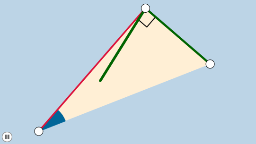
This example demonstrates geometric relationships between 2D vectors, polygons, and rotational transformations through animation. It involves core math concepts like limits, vector operations, geometric transformations, and solid geometry. GeoGebra commands and objects such as Segment, OrthogonalLine, Point, Ray, Angle, Rotate, Polygon, Midpoint, and Vector are used in the construction. Suitable for high school and above students to understand dynamic changes in vectors, geometric transformations, and solid figures.
GeoGebra Commands & Parameters
Segment(A, B) → aOrthogonalLine(B, a) → bPoint(b) → ERay(B, E) → cAngle(A, B, E) → αPoint(c) → CSegment(C, A) → dAngle(B, C, A) → βSegment(B, C) → eRotate(B, If[0 < f ≤ 1, (f * β), β], C) → B'Rotate(C, If[0 < f ≤ 1, (f * β), 0], C) → C'Segment(B', C') → e'Angle(C, A, B) → γRotate(A, If[0 < g ≤ 1, ((-g) * γ), 0], A) → A'Rotate(B, If[0 < g ≤ 1, ((-g) * γ), (-γ)], A) → B'_1Segment(A', B'_1) → a'Rotate(B, If[0 < h ≤ 1, ((-h) * α), 0], B) → B'_2Rotate(C, If[0 < h ≤ 1, ((-h) * α), (-α)], B) → C'_1Segment(B'_2, C'_1) → e'_1Polygon(B, A, C) → poly1, c_1, b_1, a_1Midpoint(e') → DVector(F, D) → uMidpoint(a') → GVector(H, G) → vMidpoint(e'_1) → IVector(J, I) → wRay(B, A) → j
AI Drawing Prompt Reference
Draw a dynamic demonstration of 2D vectors and polygons, including points A, B, and C, line segments AB, BC, and AC, as well as angles α, β, and γ. Show the dynamic changes of vectors and polygons through rotation operations. First, draw line segment AB, then construct a line b perpendicular to AB, find point E on line b, next draw ray BE, calculate angle α, then draw line segment CA, rotate points B and C, and finally draw polygon ABC.
The prompt above was compiled from the original drawing commands and is for reference only.