
Angular Momentum and Torque
Loading the math board and drawing, please wait…
In collections
GeoGebra 3D Grafikrechner mit AR - Beispielsammlung
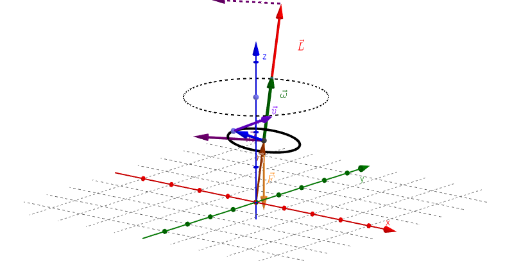
This example demonstrates the concepts of angular momentum and torque. Key mathematical concepts include vectors, rotation, and torque. Using GeoGebra commands such as Point, Circle, Rotate, and Vector, a dynamic model of angular momentum and torque is constructed. Suitable for high school physics and mathematics education.
GeoGebra Commands & Parameters
Point(zAxis) → BCircle(B, Radius, zAxis) → cPoint(c) → CRotate(C, α, zAxis) → C'Segment(A, C') → aMidpoint(a) → DCircle(D, radius, a) → dPoint(d) → PVector(D) → r_1Vector(D, D + (0, 0, ((-m) * g))) → FRotate(P, (ω_1 * t), a) → P'Vector(D, P') → rVector(D, D + (ω_1 * UnitVector[Vector[D, C']])) → ωVector(P', P' + ω ⊗ r) → vVector(D, D + (ω * I)) → LVector(D, D + r_1 ⊗ F) → MVector(E, G) → M'
AI Drawing Prompt Reference
Create a dynamic model to illustrate the concepts of angular momentum and torque. Start by drawing the z-axis, then draw a circle with the z-axis as its radius, followed by selecting a point C on the circle and rotating it around the z-axis to get C'. Draw a segment a connecting A and C', find the midpoint D of a, draw a circle with D as the center, select a point P on the circle, draw vector r_1 from D, then draw vector F, rotate P around a to get P', draw vector r from D to P', then draw vector ω, draw vector v, and finally draw vectors L and M.
The prompt above was compiled from the original drawing commands and is for reference only.