
Angle Subtended by an Arc at the Centre and at the Remaining Arc
Loading the math board and drawing, please wait…
In collections
CLASS IX CBSE MATHS ACTIVITIES
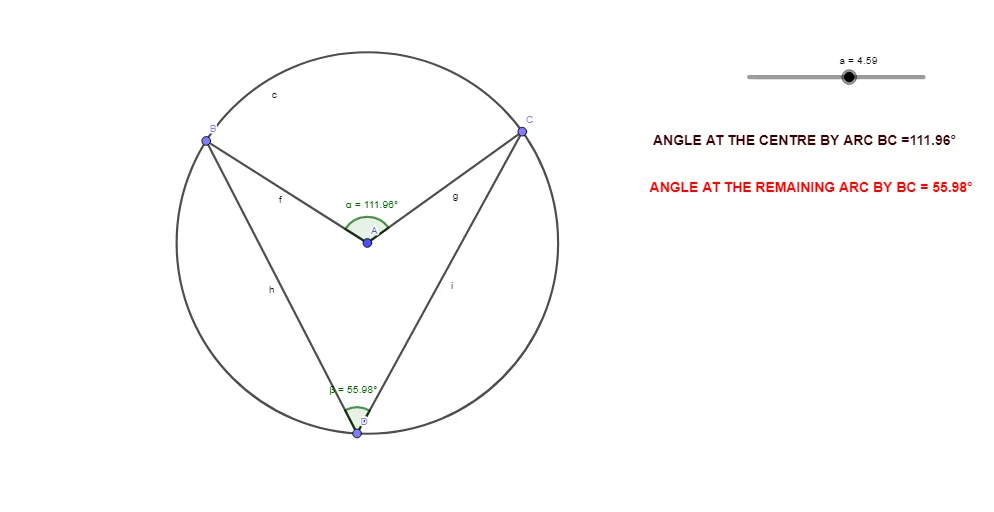
①This GeoGebra example dynamically demonstrates the relationship between the angle subtended by an arc at the centre of a circle and the angle subtended by the remaining arc at a point on the circle, showing that their sum is 180°.②Core mathematical concepts include arcs, central angles, inscribed angles (angles subtended by an arc), and supplementary angles, fundamental properties of circles in plane geometry.③Construction details: uses the Circle command to create the circle, Point to place points A, B, C, D on the circle, Segment to draw chords and radii, Angle to measure angle α (central angle) and angle β (inscribed angle on the remaining arc), with text1 and text2 displaying the angle values; dragging points allows dynamic exploration.④Suitable for upper middle school or high school students learning circle properties, and for teachers demonstrating geometric theorems in class or for students' independent inquiry, fostering dynamic geometry thinking.
GeoGebra Commands & Parameters
Circle(A, a) → cPoint(c) → BPoint(c) → CSegment(B, A) → fSegment(A, C) → gPoint(c) → DSegment(B, D) → hSegment(D, C) → iAngle(C, A, B) → αAngle(C, D, B) → β
AI Drawing Prompt Reference
Draw a circle with several points on its circumference. Place three (and optionally a fourth) points so that two of them and the center form a central angle α, created by drawing radii from the center to the two chosen points. Then select a point on the circle to define an inscribed angle β: connect this point to the same two circumference points so that β subtends the remaining arc. Mark and display the values of α and β, and make the figure dynamic so dragging the points lets you explore how the two angles relate.
The prompt above was compiled from the original drawing commands and is for reference only.