
Angle Bisector Theorem Demo
Loading the math board and drawing, please wait…
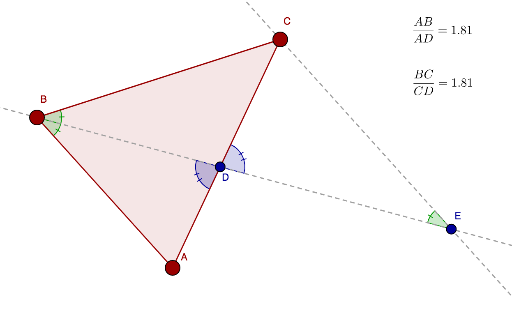
This example demonstrates the geometric relationship between an angle bisector and parallel lines using GeoGebra. It involves core concepts like angle bisectors, parallel lines, similar triangles, and rhombus properties. Construction highlights include using commands such as Polygon, AngularBisector, Intersect, Angle, Segment, and Line to build the figure and illustrate the intersection of the angle bisector with a parallel line. Suitable for high school geometry education and learning, it helps understand the Angle Bisector Theorem and applications of similar triangles.
GeoGebra Commands & Parameters
Polygon(A, C, B) → poly1, c, a, bAngularBisector(A, B, C) → dlineIntersect(dline, c) → DAngle(A, B, D) → αAngle(D, B, C) → βSegment(B, D) → dSegment(D, A) → b_1Segment(C, D) → a_1Line(C, b) → eIntersect(dline, e) → EAngle(C, E, D) → γAngle(B, D, A) → δAngle(E, D, C) → ε
AI Drawing Prompt Reference
Draw a triangle with a base side. From the vertex, construct an angle bisector that meets the base at a point. On the other side of the base, draw a line through one endpoint of the base parallel to the opposite side, extending until it intersects the extension of the angle bisector. Mark the two equal angles created by the bisector, and also mark the corresponding and alternate angles formed by the parallel line. Show the relevant segments and angle labels to illustrate the angle bisector theorem and the similar triangles relationship.
The prompt above was compiled from the original drawing commands and is for reference only.