
Angle Bisector (Problem 1)
Loading the math board and drawing, please wait…
In collections
Points, Lines, Planes, and Angles
Points, Lines, Planes, and Angles
Geometry: Introductory Definitions, Postulates, Theorems
CCSS High School: Algebra (Creating Equations)
CCSS High School: Algebra (Creating Equations)
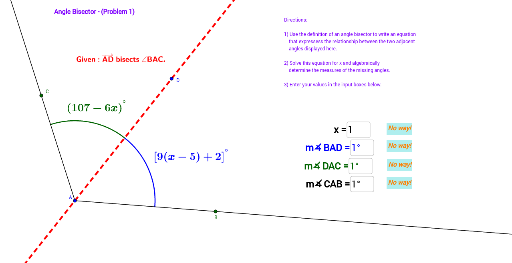
This example demonstrates the geometric construction and properties of an angle bisector. It involves core math concepts like angles, triangles, geometric construction, and linear equations. GeoGebra commands used include Ray, AngularBisector, Point, Circle, Intersect, CircleArc, and Textfield. Suitable for middle school and above students learning geometric constructions and the angle bisector theorem.
GeoGebra Commands & Parameters
Ray(A, B) → aRay(A, C) → bAngularBisector(a, b) → c, dPoint(c) → DCircle(A, 4) → eIntersect(e, a) → F,Intersect(e, c) → G, HIntersect(e, b) → I,CircleArc(A, F, H) → fCircleArc(A, H, I) → gTextfield(h) → InputBox1Textfield(α) → InputBox2Textfield(β) → InputBox3Textfield(γ) → InputBox4
AI Drawing Prompt Reference
Draw a triangle ABC with A as the vertex and B and C as the other two vertices. Draw the angle bisector of angle BAC and mark the intersection point as D. Draw a circle with center A and radius 4, and let it intersect with line segments AB, AD, and AC at points F, G, and H respectively. Draw arcs AFH and AHI. Input the degrees of angles BAC, ABC, and ACB.
The prompt above was compiled from the original drawing commands and is for reference only.