
Angle Addition (Values Shown) via Rotation
Loading the math board and drawing, please wait…
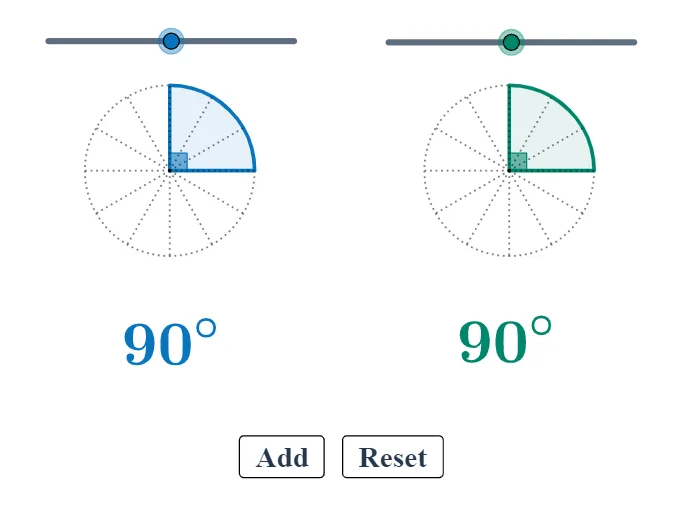
This example visually demonstrates the angle addition principle by constructing a dynamic configuration where the sum of two angles matches the resulting composed angle, with the corresponding numerical values shown on the diagram. Key ideas include angle addition, geometric interpretation using circle arcs/sector markings, and tracking how rotating rays changes the measured angles during an animation. Construction in GeoGebra relies on: Rotate to rotate rays/objects around a reference point so that directions combine; Angle to compute and display the current angle measures (e.g., α, β, γ, δ, ε, ζ, η, θ and the composed/result angles); Circle and CircleSector to draw the supporting circle and angle sectors; and Segment to connect endpoints and clearly define the angle arms. Animation drives parameter changes so points/objects (such as A, B, C, D and their primed variants) update frame by frame, making the numeric angle values vary consistently with the geometric composition. Suitable for middle/high school geometry lessons and for students learning the geometric foundations behind angle addition and related trigonometric concepts.
GeoGebra Commands & Parameters
Circle(A, B) → cCircle(C, D) → dRotate(B, a°, A) → B'Angle(B, A, B') → αRotate(D, b°, C) → D'Angle(D, C, D') → βRotate(D, 30°, C) → D'_1Angle(D, C, D'_1) → γRotate(D'_1, 30°, C) → EAngle(D'_1, C, E) → δRotate(E, 30°, C) → E'Angle(E, C, E') → εRotate(E', 30°, C) → E''Angle(E', C, E'') → ζRotate(E'', 30°, C) → E'''Angle(E'', C, E''') → ηRotate(E''', 30°, C) → FAngle(E''', C, F) → θRotate(F, 30°, C) → F'Angle(F, C, F') → ιRotate(F', 30°, C) → F''Angle(F', C, F'') → κRotate(F'', 30°, C) → F'''Angle(F'', C, F''') → λRotate(F''', 30°, C) → GAngle(F''', C, G) → μRotate(G, 30°, C) → G'Angle(G, C, G') → νRotate(B, 30°, A) → B'_1Angle(B, A, B'_1) → ξRotate(B'_1, 30°, A) → HAngle(B'_1, A, H) → οRotate(H, 30°, A) → H'Angle(H, A, H') → ρRotate(H', 30°, A) → H''Angle(H', A, H'') → σRotate(H'', 30°, A) → H'''Angle(H'', A, H''') → τRotate(H''', 30°, A) → IAngle(H''', A, I) → υRotate(I, 30°, A) → I'Angle(I, A, I') → ϕRotate(I', 30°, A) → I''Angle(I', A, I'') → χRotate(I'', 30°, A) → I'''Angle(I'', A, I''') → ψRotate(I''', 30°, A) → JAngle(I''', A, J) → ωRotate(J, 30°, A) → J'Angle(J, A, J') → α_1Segment(A, B) → fSegment(A, B'_1) → gSegment(A, H) → hSegment(A, H') → iSegment(A, H'') → jSegment(A, H''') → kSegment(A, I) → lSegment(A, I') → mSegment(A, I'') → nSegment(A, I''') → pSegment(A, J) → qSegment(A, J') → rSegment(C, D) → sSegment(C, D'_1) → tSegment(C, E) → eSegment(C, E') → f_1Segment(C, E'') → g_1Segment(C, E''') → h_1Segment(C, F) → i_1Segment(C, F') → j_1Segment(C, F'') → k_1Segment(C, F''') → l_1Segment(C, G) → m_1Segment(C, G') → n_1CircleSector(A, B, B') → c_1CircleSector(C, D, D') → d_1Circle(K, L) → e_1Segment(K, L) → p_1Rotate(L, 30°, K) → L'Angle(L, K, L') → β_1Rotate(L', 30°, K) → L''Angle(L', K, L'') → γ_1Rotate(L'', 30°, K) → L'''Angle(L'', K, L''') → δ_1Rotate(L''', 30°, K) → MAngle(L''', K, M) → ε_1Rotate(M, 30°, K) → M'Angle(M, K, M') → ζ_1Rotate(M', 30°, K) → M''Angle(M', K, M'') → η_1Rotate(M'', 30°, K) → M'''Angle(M'', K, M''') → θ_1Rotate(M''', 30°, K) → NAngle(M''', K, N) → ι_1Rotate(N, 30°, K) → N'Angle(N, K, N') → κ_1Rotate(N', 30°, K) → N''Angle(N', K, N'') → λ_1Rotate(N'', 30°, K) → N'''Angle(N'', K, N''') → μ_1Segment(K, L') → q_1Segment(K, L'') → r_1Segment(K, L''') → s_1Segment(K, M) → t_1Segment(K, M') → a_1Segment(K, M'') → b_1Segment(K, M''') → f_2Segment(K, N) → g_2Segment(K, N') → h_2Segment(K, N'') → i_2Segment(K, N''') → j_2Rotate(L, (a + b)°, K) → L'_1Angle(L, K, L'_1) → ν_1CircleSector(K, L, L'_1) → c_2Circle(K, L) → d_2
AI Drawing Prompt Reference
Create a dynamic rotation diagram with two circles c and d, and a series of points B', D', D'_1, E, E', E'', E''', F, F', F'', F''', G, G', H, H', H'', H''', I, I', I'', I''', J generated by rotating points around a reference point. The angles α, β, γ, δ, ε, ζ, η, θ, ι, κ, λ, μ, ν, ξ, ο, ρ, σ, τ, υ, ϕ, χ, ψ, ω are formed by these points and change dynamically as they rotate, illustrating the angle addition principle.
The prompt above was compiled from the original drawing commands and is for reference only.