
Angle Addition Postulate: Formative Assessment
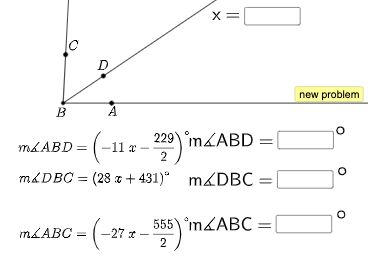
Loading the math board and drawing, please wait…
This example demonstrates the Angle Addition Postulate, involving key mathematical concepts such as angle measurement and addition. Using GeoGebra commands like Sequence, RandomElement, Random, etc., it dynamically illustrates the Angle Addition Postulate. Suitable for middle school and above students for geometric construction and formative assessment.
GeoGebra Commands & Parameters
Sequence(i, i, -30, 30, 0.5) → l1RandomElement(l1) → solSequence(i, i, 10, 85, 1) → firstalistRandomElement(firstalist) → firstaSequence(i, i, firsta + 5, 90, 1) → secondalistRandomElement(secondalist) → secondaRandom(-30, 30) → aRandom(-30, 30) → cRandom(-30, 30) → fExpand((a * x) + b) → hExpand((c * x) + d) → pExpand((f * x) + g) → qIntersect(xAxis, yAxis) → BPoint(xAxis) → ARotate(A, (firsta * pi / 180), B) → DRotate(D, (seconda * pi / 180), B) → CRay(B, A) → kRay(B, D) → lRay(B, C) → mTextfield(n) → InputBox1Textfield(o) → InputBox3Textfield(r) → InputBox4If(n ≟ sol, "√", "X") → text5If(o ≟ seconda, "√", "X") → text7If(r ≟ biga, "√", "X") → text8Textfield(s) → InputBox2If(s ≟ firsta, "√", "X") → text6
AI Drawing Prompt Reference
Draw a coordinate plane with a fixed vertex point at the intersection of the axes, and construct three rays emanating from this point. Choose one ray as the initial direction, then obtain a middle ray by rotating the initial ray by a first given angle around the vertex, and obtain a final ray by rotating the middle ray again by a second given angle around the same vertex. The three rays should visually represent the idea that the total angle equals the sum of the two component angles. Add input boxes for the angle measures and display a simple check mark or cross for the relevant angle relationships as the angle parameters vary.
The prompt above was compiled from the original drawing commands and is for reference only.