
Ambiguous Case of the Sine Law (SSA) Dynamic Exploration
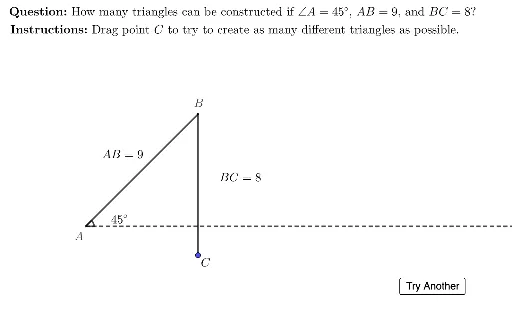
Loading the math board and drawing, please wait…
① This interactive GeoGebra example dynamically demonstrates the ambiguous case of the sine law, where given two sides and a non-included angle (SSA) can yield zero, one, or two possible triangles. ② The core mathematical concepts include the sine rule, triangle solvability conditions, and geometric intersection analysis. ③ Construction highlights: using GeoGebra commands such as Random, Min, Rotate, Point, Circle, Intersect, DynamicCoordinates, TableText, LaTeX, Polygon, Segment, and Angle to generate random parameters, display solution counts and angles in a table, and construct the triangle visually; sliders and buttons (e.g., TryAnother) enable interactive exploration. ④ Suitable for high school or pre-university students learning trigonometry and triangle solving, as well as for classroom demonstrations or self-study to grasp the multiplicity of solutions and their geometric origins.
GeoGebra Commands & Parameters
Random(5, 13) → lenABMin(lenAB - 1, (lenAB * sin(angleA)) + 3) → maxBCRandom(minBC, maxBC) → lenBCRotate((1, 0), angleA, A) → B'Point(Segment[(10 - lenBC, 0), (10 + lenBC, 0)]) → C_1Circle(B, lenBC) → BcirclePoint(Bcircle) → K_1Intersect(Bcircle, xAxis) → C'_1, C'_2DynamicCoordinates(K_1, If[Distance[C'_1, K_1] < 0.5, x(C'_1), If[Distance[C'_2, K_1] < 0.5, x(C'_2), x(K_1)]], If[Distance[C'_1, K_1] < 0.5, y(C'_1), If[Distance[C'_2, K_1] < 0.5, y(C'_2), y(K_1)]]) → CTableText({A1:A3, B1:B3, C1:C3, D1:D3, E1:E3}, "|10000 _100 v") → displayTblLaTeX("C") → cLblPoint(Bcircle) → C''Polygon(A, B, C'_1) → t1, i, j, kPolygon(A, B, C'_2) → t2, f, g, hSegment(B, C) → swingArmIntersect(swingArm, xAxis) → KAngle(C'_1, A, B') → dispAngleSegment(A, A + (25, 0)) → bottomSegmentLaTeX((((((("\text{\textbf{Question: }How many triangles can be constructed if \(\angle A =" * angleA) * "\), \(AB =") * lenAB) * "\), and \(BC =") * lenBC) * "\)?}")) → MainInstrucLaTeX("\text{\textbf{Instructions: }Drag point \(C\) to try to create as many different triangles as possible.}") → SpecInstruc
AI Drawing Prompt Reference
Draw a triangle with angle A randomly between 5 and 13 degrees, and side AB randomly between 5 and 13 units. Generate side BC randomly within the range of its minimum and maximum possible values. Rotate point B around point A by angle A to get point B'. On the x-axis, randomly place point C1, then draw a circle with center B and radius BC, and find the intersection points C'1 and C'2 with the x-axis. Choose the closer intersection point as point C to construct triangle ABC. Depending on the values of angle A, AB, and BC, you can construct 0, 1, or 2 different triangles.
The prompt above was compiled from the original drawing commands and is for reference only.