
Airplane Vectors
Loading the math board and drawing, please wait…
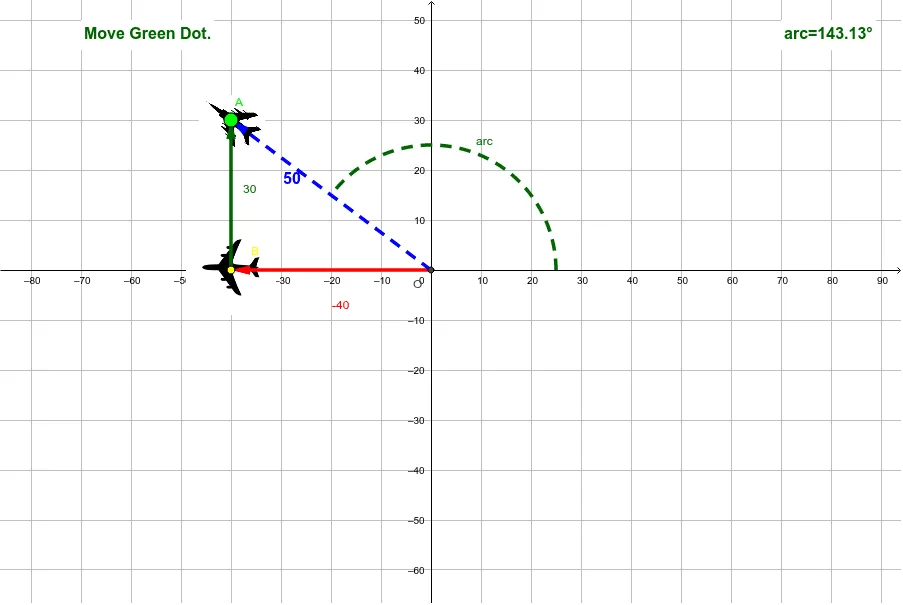
This example demonstrates the distance between two planes that leave the same point simultaneously. It involves core math concepts like vectors, angles, rotation, and coordinate geometry. Constructed using GeoGebra commands such as Intersect, Vector, Angle, and Rotate. Suitable for high school students learning vector and kinematics.
GeoGebra Commands & Parameters
Intersect(xAxis, yAxis) → OVector(B, A) → A_{vector}Vector(O, B) → B_{vector}Vector(O, A) → ResultAngle(Segment[O, (5, 0)], Segment[O, A]) → O_{angle}CircleArc(O, (25, 0), A) → arcCorner(pic2, 4) → A_4Corner(pic1, 3) → B_3Corner(pic1, 4) → B_4Midpoint(B_1, B_3) → B_cCorner(pic2, 3) → A_3Midpoint(A_1, A_3) → A_cPolygon(B_1, B_2, B_3, B_4) → poly1, b_1, b_2, b_3, b_4Polygon(A_1, A_2, A_3, A_4) → poly2, a_1, a_2, a_3, a_4PointIn(poly1) → CRotate(pic1, α, B_c) → pic1'Rotate(pic2, α, A_c) → pic2'Angle(Result) → testRotate(pic2, Angle[Result] - 90°, A_c) → pic2''
AI Drawing Prompt Reference
Draw a graph of two plane vectors leaving the same point. The first vector points from the origin to point B, and the second vector points from the origin to point A. Draw the angle between these vectors and a circle arc. Construct a quadrilateral and another quadrilateral, then find the center points of both quadrilaterals. Rotate the first quadrilateral around its center point and rotate the second quadrilateral around its center point. Finally, adjust the rotation angle of the second quadrilateral based on the result to maintain the desired geometric relationship.
The prompt above was compiled from the original drawing commands and is for reference only.