
Addition of Fractions by Guillermo Bautista
Loading the math board and drawing, please wait…
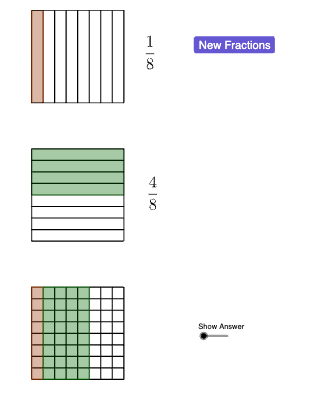
This example demonstrates the process of adding fractions. Key mathematical concepts include fraction addition. Using GeoGebra commands such as Random, Intersect, and Point, a dynamic demonstration of fraction addition is constructed. Suitable for upper elementary or middle school students learning fraction addition.
GeoGebra Commands & Parameters
Random(3, 8) → d1Random(1, d1 - 2) → n1Intersect(xAxis, yAxis) → APoint(yAxis) → BPoint(xAxis) → DSequence(Segment[(i / d1, 0), (i / d1, 1)], i, 0, d1, 1) → l1Polygon(B, F, E, A) → q1, b, f, e, aSegment(B, C) → gSegment(A, D) → hRandom(1, d1 - n1) → n2Random(d1, 8) → d2Point(yAxis) → GPoint(yAxis) → JSequence(Segment[(0, (-(i / d2)) - 0.5), (1, (-(i / d2)) - 0.5)], i, 0, d2, 1) → l2Polygon(G, H, L, K) → q2, g_1, h_1, l, kSegment(G, J) → iSegment(H, I) → jSegment(G, H) → mSegment(J, I) → nSequence(Segment[(i / d1, -2), (i / d1, -3)], i, 0, d1, 1) → l3Sequence(Segment[(0, (-(i / d2)) - 2), (1, (-(i / d2)) - 2)], i, 0, d2, 1) → l4Point(yAxis) → MVector(B, M) → uTranslate(B, u) → B'Translate(F, u) → F'Translate(E, u) → E'Translate(A, u) → A'Polygon(B', F', E', A') → q1', b', f', e', a'Polygon(F', E', O, N) → q3, p, q, o, n_1Polygon(N, R, S, Q) → q4, n_2, r, s, q_1
AI Drawing Prompt Reference
Create a geometric demonstration of fraction addition. On the left side, draw a horizontal fraction bar divided into equal segments by vertical lines, with several segments filled to represent one fraction. On the right side, draw a vertical fraction bar divided into equal segments by horizontal lines, with several segments filled to represent another fraction. Then copy the left fraction region using vector translation and place it above the right fraction region, positioning the two fraction representations adjacent to each other to visually show the concept of adding fractions. Use clean geometric style with clear lines and distinct fill colors.
The prompt above was compiled from the original drawing commands and is for reference only.