
Addition and Subtraction of Vectors
Loading the math board and drawing, please wait…
In collections
Vectors in 2D
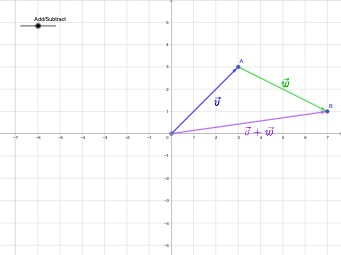
This example demonstrates vector addition and subtraction in two-dimensional space. It illustrates the geometric interpretation of vector operations using coordinate geometry. Key concepts include vector addition rules, vector subtraction rules, and coordinate representation. Construction involves using GeoGebra commands like Point, Vector, Midpoint, Line, and Circle to create and manipulate vector objects. This example is suitable for middle or high school mathematics education to help students grasp the geometric significance of vector operations and their applications in coordinate systems.
GeoGebra Commands & Parameters
Point(xAxis) → A_{1}Vector(A_{1}, A) → vVector(A, B) → wVector(A_{1}, B) → uMidpoint(A, A_{1}) → DMidpoint(A, B) → EMidpoint(A_{1}, B) → FLine(A, B) → fCircle(A, B) → cIntersect(c, f, 2) → GVector(A, G) → aMidpoint(A, G) → HVector(A_{1}, G) → bMidpoint(G, A_{1}) → I
AI Drawing Prompt Reference
On a two-dimensional coordinate plane, place a point on the horizontal axis as a starting point. From this starting point, draw vectors to two given points, and also connect the starting point to the second given point to form a third vector, illustrating vector addition and subtraction geometrically. Mark midpoints between the starting point and the first point, between the first and second points, and between the starting point and the second point. Draw a line through the first and second points, and draw a circle centered at the first point passing through the second point; this circle intersects the line at another point. From the first point to this intersection, draw a vector and mark its midpoint; also from the starting point to the intersection, draw a vector and mark its midpoint. The final figure includes multiple vectors, midpoints, a line, and a circle, clearly showing the geometric construction of vector operations.
The prompt above was compiled from the original drawing commands and is for reference only.