
Adding Vectors using Unit Vector Method
Loading the math board and drawing, please wait…
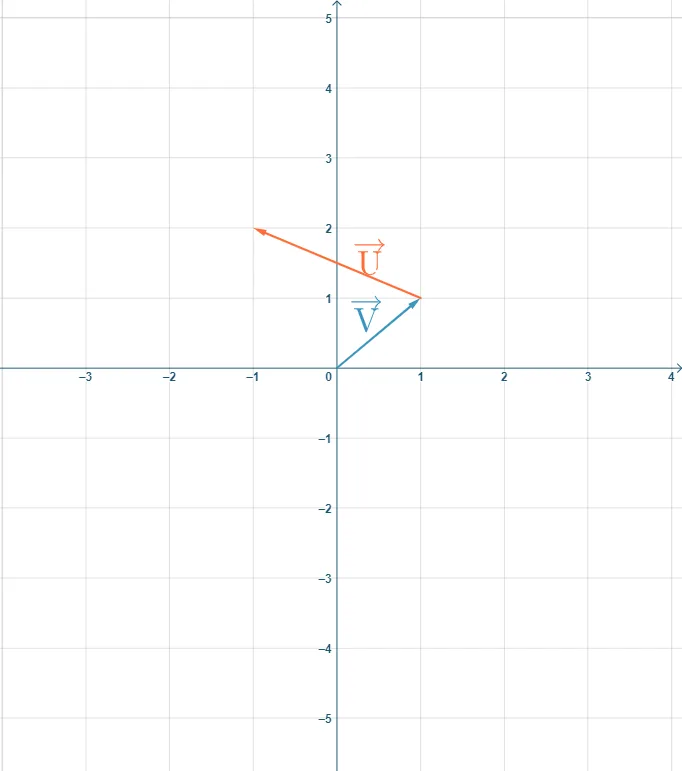
This example demonstrates vector addition using the unit vector method. It involves core math concepts like vectors, unit vectors, Pythagorean theorem, and special points in solid geometry. Constructed with GeoGebra commands: Vector, Textfield, Angle, If. Suitable for high school and university-level physics and mathematics education on vector composition and decomposition.
GeoGebra Commands & Parameters
Vector((MagVx, MagVy)) → VTextfield(MagVx) → InputBox1Textfield(MagVy) → InputBox2Vector((MagVx, 0)) → VxVector(VyStart, (MagVx, MagVy)) → VyAngle(Vx, V) → αVector((MagUx, MagUy)) → UPointerTextfield(MagUx) → InputBox3Textfield(MagUy) → InputBox5Vector((0, MagUy)) → UYPointerVector((MagUx, 0)) → UXPointerVector(UyStart, (MagVx + MagUx, MagVy + MagUy)) → UyVector((MagVx + MagUx, MagVy + MagUy)) → ResultantVector(UStart, Point[(MagVx, MagVy), UPointer]) → UVector(UStart, Point[(MagVx, MagVy), UXPointer]) → UxVector((0, MagVy + MagUy)) → RyVector((MagVx + MagUx, 0)) → RyPointerVector((0, MagVy + MagUy), Point[(0, MagVy + MagUy), RyPointer]) → RxVector((1, 0)) → PosXPointerAngle(PosXPointer, Resultant) → θIf(MagR ≟ ansR, "Good Job!", " ") → text20If(ansTheta ≟ theta, "Good Job!", " ") → text19Textfield(ansRi) → InputBox4Textfield(ansRj) → InputBox6If(ri ≟ ansRi ∧ rj ≟ ansRj, "Good Job!", " ") → text30
AI Drawing Prompt Reference
Draw a diagram illustrating vector addition using the unit vector method. Start by plotting two vectors with labeled magnitudes, then draw their horizontal and vertical components. Next, represent these components with unit vectors and combine them to form the resultant vector. Finally, verify the magnitude and direction of the resultant vector using coordinates and angles, and provide corresponding feedback messages.
The prompt above was compiled from the original drawing commands and is for reference only.