
Interactive Demonstration of Vectors and Vector Operations
Loading the math board and drawing, please wait…
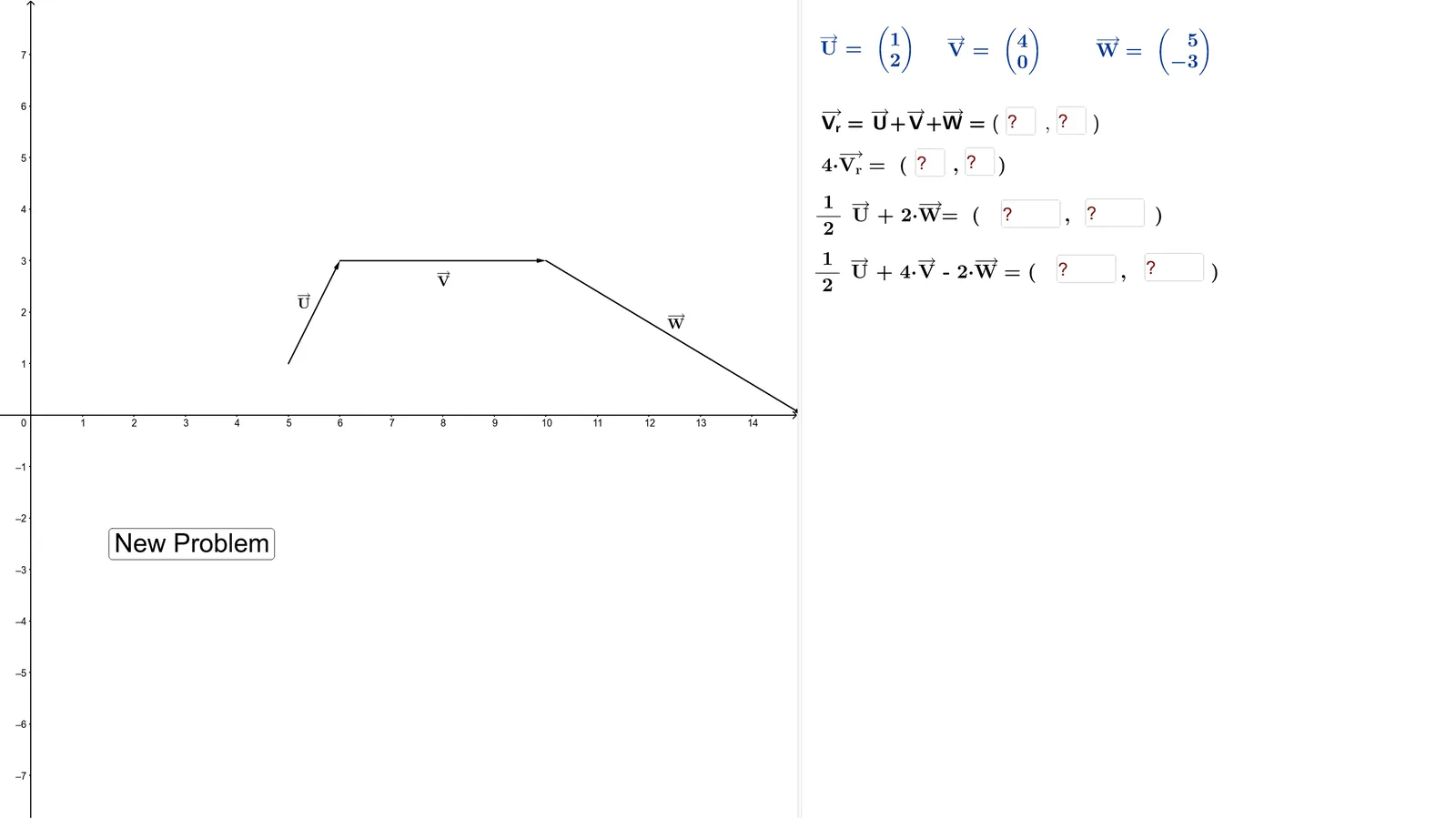
①This example demonstrates basic vector operations, including vector addition, subtraction, and scalar multiplication, through an interactive interface; ②The core mathematical concepts involved are vectors, vector magnitude, direction, and properties of vector operations; ③Construction highlights: From the 'Construction Summary' below, commands/objects used in GeoGebra include Random (to generate random vector starting points), Element (to select elements), Vector (to create vectors), Textfield (to display text information), and If (for conditional logic); ④Suitable for: This example is suitable for high school students learning basic vector concepts and operations, helping deepen understanding through dynamic demonstrations, and can be used as an aid in classroom teaching.
GeoGebra Commands & Parameters
Random(0, 1) → fRandom(2, 4) → iRandom(1, 4) → pickElement(s, pick) → hElement(t_1, pick) → a_1Random(2, 4) → rRandom(6, 7) → bRandom(4, 5) → aRandom(8, 15) → dRandom(2, 5) → cVector(A, B) → uVector(F, E) → wVector(B, F) → vVector(A, E) → V_rTextfield(ac) → InputBox3Textfield(ad) → InputBox4Textfield(ae) → InputBox5Textfield(af) → InputBox6Textfield(aa) → InputBox1Textfield(ab) → InputBox2Element(t, pick) → text3Textfield(ag) → InputBox7Textfield(ah) → InputBox8Random(0, 1) → f_2Random(1, 4) → pick_1Element(s_1, pick_1) → h_2Random(4, 5) → a_2Random(8, 15) → d_2Textfield(ae) → InputBox5_1Textfield(af) → InputBox6_1Random(0, 1) → f_3Random(1, 4) → pick_2Element(s_2, pick_2) → h_3Random(4, 5) → a_3Random(8, 15) → d_3Textfield(ae) → InputBox5_2Textfield(af) → InputBox6_2Random(0, 1) → f_4Random(1, 4) → pick_3Element(s_3, pick_3) → h_4Random(4, 5) → a_4Random(8, 15) → d_4Textfield(ae_1) → InputBox5_3Textfield(af_1) → InputBox6_3Random(0, 1) → f_5Random(1, 4) → pick_4Element(s_4, pick_4) → h_5Random(4, 5) → a_5Random(8, 15) → d_5Textfield(ae_2) → InputBox5_4Textfield(af_2) → InputBox6_4If(ae ≟ n ∧ af ≟ o, "Good Job!", "Try Again") → text2If(ab ≟ k ∧ aa ≟ j, "Good Job!", "Try Again") → text2_4If(ac ≟ l ∧ ad ≟ m, "Good Job!", "Try Again") → text2_1If(ag ≟ h_1 ∧ ah ≟ i_1, "Good Job!", "Try Again") → text2_3
AI Drawing Prompt Reference
Create an interactive demonstration of vector operations, showing two vectors u and w with starting points at A and F, and ending points at B and E. Display vector addition, subtraction, and scalar multiplication, and use text boxes to input vector components and dynamically update the vector representations.
The prompt above was compiled from the original drawing commands and is for reference only.