
Vector Assessment
Loading the math board and drawing, please wait…
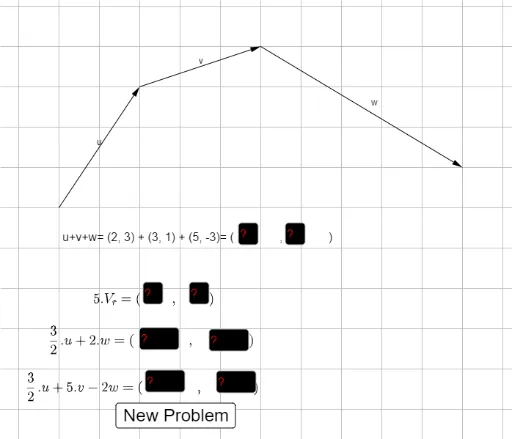
This example demonstrates fundamental vector operations and visualizations in 2D space, involving core concepts like vector addition, dot product, magnitude, unit vectors, and plane equations. It utilizes commands like Random, Element, Vector, Textfield, and If in GeoGebra for construction. Suitable for high school mathematics education to deepen understanding and practice vector skills.
GeoGebra Commands & Parameters
Random(0, 1) → fRandom(2, 4) → iRandom(1, 4) → pickElement(s, pick) → hElement(t_1, pick) → a_1Random(2, 4) → rRandom(6, 7) → bRandom(4, 5) → aRandom(8, 15) → dRandom(2, 5) → cVector(A, B) → uVector(F, E) → wVector(B, F) → vVector(A, E) → V_rTextfield(ac) → InputBox3Textfield(ad) → InputBox4Textfield(ae) → InputBox5Textfield(af) → InputBox6Textfield(aa) → InputBox1Textfield(ab) → InputBox2If(ae ≟ n ∧ af ≟ o, "Good Job", "Try Again") → text2Element(t, pick) → text3Textfield(ag) → InputBox7Textfield(ah) → InputBox8Random(0, 1) → f_2Random(1, 4) → pick_1Element(s_1, pick_1) → h_2Random(4, 5) → a_2Random(8, 15) → d_2Textfield(ae) → InputBox5_1Textfield(af) → InputBox6_1Random(0, 1) → f_3Random(1, 4) → pick_2Element(s_2, pick_2) → h_3Random(4, 5) → a_3Random(8, 15) → d_3Textfield(ae) → InputBox5_2Textfield(af) → InputBox6_2Random(0, 1) → f_4Random(1, 4) → pick_3Element(s_3, pick_3) → h_4Random(4, 5) → a_4Random(8, 15) → d_4Textfield(ae_1) → InputBox5_3Textfield(af_1) → InputBox6_3Random(0, 1) → f_5Random(1, 4) → pick_4Element(s_4, pick_4) → h_5Random(4, 5) → a_5Random(8, 15) → d_5Textfield(ae_2) → InputBox5_4Textfield(af_2) → InputBox6_4If(ab ≟ k ∧ aa ≟ j, "Good Job", "Try Again") → text2_4If(ac ≟ l ∧ ad ≟ m, "Good Job", "Try Again") → text2_1If(ag ≟ h_1 ∧ ah ≟ i_1, "Good Job", "Try Again") → text2_3