
Acute Angles of a Right Triangle by Tim Brzezinski
Loading the math board and drawing, please wait…
In collections
Congruence (CO) Cluster
Congruence (Vol 2)
CCSS High School: Geometry (Congruence) Volume 2
CCSS High School: Geometry (Congruence) Volume 2
CCSS High School: Geometry (Congruence) Volume 2
Geometry (Congruence) Volume 2
CCSS High School: Geometry (Congruence) Volume 2
CCSS High School: Geometry (Congruence) Volume 2
CCSS High School: Geometry (Congruence) Volume 2
CCSS High School: Geometry (Congruence) Volume 2
CCSS High School: Geometry (Congruence) Volume 2
CCSS High School: Geometry (Congruence) Volume 2
CCSS High School: Geometry (Congruence) Volume 2
Gail LeBlancCCSS High School: Geometry (Congruence) Volume 2
CCSS High School: Geometry (Congruence) Volume 2
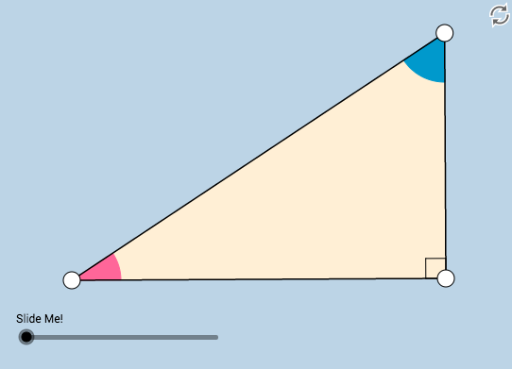
This example demonstrates the properties of acute angles in a right triangle, involving angle concepts. Using GeoGebra commands such as Line, Circle, Intersect, etc., one can discover and investigate the properties of acute angles in a right triangle. Suitable for middle school and above students to learn geometric construction and triangle properties.
GeoGebra Commands & Parameters
Line(A, B) → fOrthogonalLine(B, f) → gCircle(B, 1) → cIntersect(c, g, 2) → CRay(B, C) → hPoint(h) → DPolygon(A, B, D) → poly1, d, a, bSegment(A, B) → iSegment(B, D) → jSegment(D, A) → kAngle(D, B, A) → αMin(j, i) → eCircle(D, (0.2 * e)) → pCircle(A, (0.2 * e)) → qIntersect(p, k, 1) → EIntersect(p, j, 1) → FIntersect(q, i, 1) → GIntersect(q, k, 1) → HCircleSector(D, E, F) → rCircleSector(A, G, H) → sDilate(D, If[0 < l ≤ 1, 1 - l, 0], B) → D'Vector(D, D') → uTranslate(r, u) → r'Angle(E, D, F) → βAngle(G, A, H) → γRotate(r', If[1 < l ≤ 2, ((-(l - 1)) * (π / 2 + γ)), (-(π / 2 + γ))], B) → r''Circle(A, 1) → tRotate(s, If[2 < l ≤ 3, ((l - 2) * (π - γ)), π - γ], A) → s'Dilate(A, If[3 < l ≤ 4, 4 - l, 0], B) → A'Vector(A, A') → vTranslate(s', v) → s''CircleArc(A, G, H) → c_1CircleArc(D, E, F) → d_1
AI Drawing Prompt Reference
Draw a right triangle and label its two acute angles. Start by drawing a line segment AB, then draw a unit circle with B as the center, and draw a tangent line at B. The intersection of the tangent and the circle is point C. Connect BC to form a right triangle ABD. Measure the angles at DAB and DBA, and use these angles to construct two arcs, adjusting their sizes and positions to form two arcs corresponding to the two acute angles of the triangle.
The prompt above was compiled from the original drawing commands and is for reference only.