
Activity 9: Create Your Own Rotation
Loading the math board and drawing, please wait…
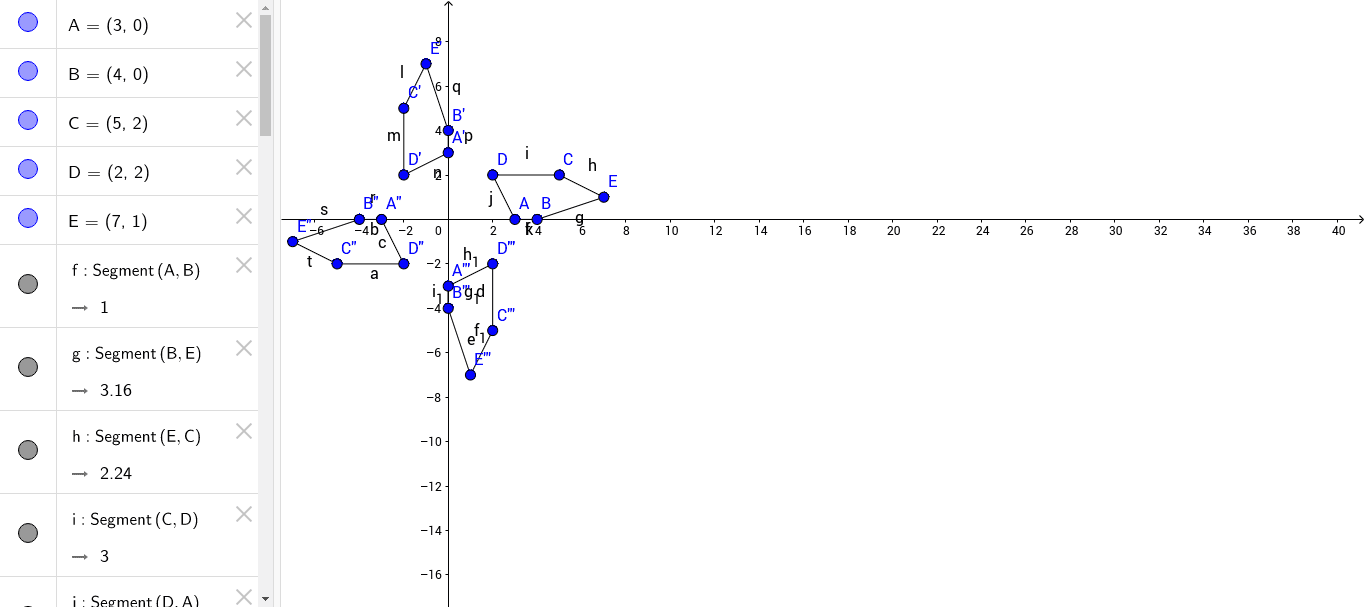
① This example demonstrates how to construct a rotation of a geometric figure independently in GeoGebra, observing the changes in position and orientation before and after rotation. ② Core mathematical concepts include geometric transformations such as rotation, along with dilation, 3D vectors, and correlation, involving transformations of points, segments, and polygons. ③ Construction highlights: From the construction summary, the Segment command is used to create multiple segment objects (e.g., A, B, C, D, E), and repeated rotations generate primed points (A', B', C', etc.) and double-primed points (A'', B'', etc.), resulting in three sets of rotated figures; objects include points, segments, and auxiliary elements named f, g, h, i, j, k, reflecting a step-by-step construction and transformation process. ④ Suitable for middle or high school geometry lessons or student self-exploration of rotation properties, and for teachers to demonstrate dynamic geometric transformations, helping students understand rotation center, rotation angle, and corresponding point relationships.
GeoGebra Commands & Parameters
Segment(A, B) → fSegment(B, E) → gSegment(E, C) → hSegment(C, D) → iSegment(D, A) → jSegment(A, B) → kSegment(E', C') → lSegment(C', D') → mSegment(D', A') → nSegment(A', B') → pSegment(B', E') → qSegment(A'', B'') → rSegment(B'', E'') → sSegment(E'', C'') → tSegment(C'', D'') → aSegment(B'', A'') → bSegment(A'', D'') → cSegment(D''', C''') → dSegment(C''', E''') → eSegment(E''', B''') → f_1Segment(B''', A''') → g_1Segment(D''', A''') → h_1Segment(A''', B''') → i_1
AI Drawing Prompt Reference
Draw a polygon outline made of connected segments. First create the original shape, then rotate it around a center point by a certain angle to get a second shape, and rotate again to get third and fourth shapes. Each shape has the same vertex order and connections, showing how the figure changes position and orientation after each rotation. The result is a set of similar polygons at different angles, illustrating the rotation transformation.
The prompt above was compiled from the original drawing commands and is for reference only.