
Absolute Value Equation Generator with Feedback
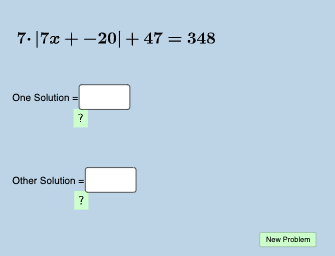
Loading the math board and drawing, please wait…
In collections
A1.ACE.1 - Create and solve equations and inequalities
Absolute Value Equations & Inequalities
Absolute Value Equations & Inequalities
This example demonstrates the solving process of absolute value equations with dynamic generation and feedback. Core math concepts include absolute value equations, solution methods, and feedback mechanisms. Constructed using commands like Random, Sequence, Union, RandomElement, Textfield, FractionText, and objects such as ans_1, aleft, aright, etc. Suitable for high school mathematics teaching to understand and master the techniques of solving absolute value equations.
GeoGebra Commands & Parameters
Random(-40, 40) → ans_1Sequence(i, i, -20, -1, 1) → aleftSequence(i, i, 1, 20, 1) → arightUnion(aleft, aright) → alistSequence(i, i, -20, 20, 1) → blistRandomElement(alist) → aRandomElement(blist) → bSequence(i, i, -10, -1, 1) → kleftSequence(i, i, 1, 10, 1) → krightUnion(kleft, kright) → klistRandomElement(klist) → kRandom(-50, 50) → dTextfield(g) → InputBox1Textfield(h) → InputBox2FractionText(g) → text3FractionText(h) → text4FractionText(oneposs) → text5FractionText(otherposs) → text6