
A Pythagorean Theorem Proof Without Words (Geometric Rearrangement)
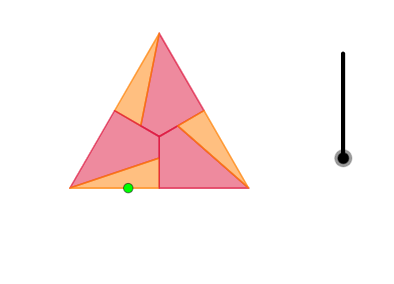
Loading the math board and drawing, please wait…
This example demonstrates the Pythagorean Theorem visually by rearranging areas: in a right triangle, the combined area of the squares on the legs matches the area of the square on the hypotenuse. It centers on geometry ideas such as area-preserving rearrangement, right-triangle structure, and constructing partitions using key points and lines (midpoints, angle bisectors) so that the “picture” encodes the proof. Construction details include: Intersect for key intersection points; Polygon to build and combine the tile-like regions; Midpoint and Centroid to locate alignment and placement; Point, Line, and Segment to define the geometric skeleton; Angle and LineBisector to form bisector-based structure; and Rotate plus Circle to create rotated/curved boundaries used in the rearrangement. An If statement helps maintain correct configuration under parameter changes. Suitable for middle and high school geometry lessons, proof-by-rearrangement discussions, and interactive learning of classic theorems.
GeoGebra Commands & Parameters
Intersect(xAxis, yAxis) → APolygon(A, B, 3) → poly1, f, g, h, CCentroid(poly1) → DMidpoint(h) → EMidpoint(g) → FMidpoint(f) → GPoint(Segment[A, G]) → HLine(C, H) → iSegment(E, D) → jIntersect(i, j) → IAngle(A, C, H) → αPolygon(C, E, I) → t1, i_1, c, ePolygon(C, I, D, F) → q1, c_1, i_2, d, f_1Line(A, B) → kRotate(k, α, B) → k'Intersect(k', yAxis) → JPolygon(B, J, 3) → poly2, l, m, n, KCentroid(poly2) → LCircle(D, Segment[L, B]) → pLine(D, C) → qLine(D, A) → rLine(D, B) → sIntersect(p, r, 2) → MIntersect(p, s, 2) → NIntersect(p, q, 2) → OLineBisector(C, O) → tMidpoint(O, M) → PLineBisector(I, E) → aIntersect(t, a) → QIf(0 ≤ o ≤ 1, Polygon[Rotate[C, ((-o) * α), Q], Rotate[I, ((-o) * α), Q], Rotate[D, ((-o) * α), Q], Rotate[F, ((-o) * α), Q]]) → q2If(0 ≤ o ≤ 1, Rotate[I, ((-o) * α), Q]) → RRotate(If[0 ≤ o ≤ 1, Polygon[Rotate[C, ((-o) * α), Q], Rotate[E, ((-o) * α), Q], Rotate[I, ((-o) * α), Q]]], (o * π), R) → t2Rotate(If[0 ≤ o ≤ 1, Rotate[E, ((-o) * α), Q]], (o * π), R) → SRotate(I, (2 * π / 3), D) → I'Rotate(I, (-2 * π / 3), D) → I'_1Polygon(A, E, D, I') → q3, a_1, e_1, d_1, i'Rotate(Rotate[If[0 ≤ o ≤ 1, Polygon[Rotate[A, ((-o) * α), Q], Rotate[E, ((-o) * α), Q], Rotate[D, ((-o) * α), Q], Rotate[I', ((-o) * α), Q]]], (o * π), R], ((-o) * π), S) → q4Rotate(Rotate[If[0 ≤ o ≤ 1, Rotate[I', ((-o) * α), Q]], (o * π), R], ((-o) * π), S) → TPolygon(A, I', G) → t3, g_1, a_2, bRotate(Rotate[Rotate[If[0 ≤ o ≤ 1, Polygon[Rotate[A, ((-o) * α), Q], Rotate[I', ((-o) * α), Q], Rotate[G, ((-o) * α), Q]]], (o * π), R], ((-o) * π), S], (o * π), T) → t4Polygon(B, G, D, I'_1) → q5, b_1, g_2, d_2, i'_1Rotate(Rotate[Rotate[If[0 ≤ o ≤ 1, Rotate[G, ((-o) * α), Q]], (o * π), R], ((-o) * π), S], (o * π), T) → URotate(Rotate[Rotate[Rotate[If[0 ≤ o ≤ 1, Polygon[Rotate[B, ((-o) * α), Q], Rotate[G, ((-o) * α), Q], Rotate[D, ((-o) * α), Q], Rotate[I'_1, ((-o) * α), Q]]], (o * π), R], ((-o) * π), S], (o * π), T], ((-o) * π), U) → q6Polygon(B, I'_1, F) → t5, f_2, b_2, h_1Rotate(Rotate[Rotate[Rotate[If[0 ≤ o ≤ 1, Rotate[I'_1, ((-o) * α), Q]], (o * π), R], ((-o) * π), S], (o * π), T], ((-o) * π), U) → VRotate(Rotate[Rotate[Rotate[Rotate[If[0 ≤ o ≤ 1, Polygon[Rotate[B, ((-o) * α), Q], Rotate[I'_1, ((-o) * α), Q], Rotate[F, ((-o) * α), Q]]], (o * π), R], ((-o) * π), S], (o * π), T], ((-o) * π), U], (o * π), V) → t6
AI Drawing Prompt Reference
On a coordinate plane, set up the two perpendicular axes and start from their intersection as a key vertex. Build a geometric skeleton by drawing the relevant lines from that vertex (including a horizontal line) and forming an angle at the vertex using that line structure. Compute several intersection and alignment points from the constructed lines, then form multiple polygonal regions by connecting these points. Use centroid and midpoints to place the pieces consistently. Create a circle using the centroid and a segment endpoint, find additional intersection points of this circle with constructed lines, and use the resulting points to shape curved or arc-like boundaries. Finally, rearrange the polygonal regions by rotating them around the vertex by angles derived from the constructed angle, assembling a symmetric set of tiles intended to visually match the area correspondence in a right-triangle proof.
The prompt above was compiled from the original drawing commands and is for reference only.