
A Perfect Square - Grayscale
Loading the math board and drawing, please wait…
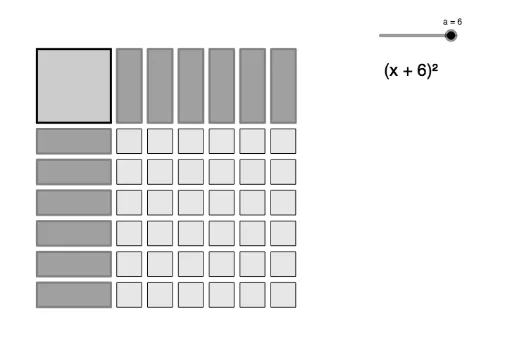
This example demonstrates how students can manipulate the symbolic form of a perfect square quadratic and visualize its area model representation. Core math concepts include quadratic functions, area models, and geometric representations. It uses GeoGebra commands Polygon and Sequence, and objects like a, A, B, C, D, poly1, a_1, b, d, c, text1, text2, list1, list2, list3. Suitable for high school mathematics education to help students understand the geometric meaning of quadratic functions.
GeoGebra Commands & Parameters
Polygon(A, B, D, C) → poly1, a_1, b, d, cSequence(Polygon[(3.25 + (1.25 * n), 3), (4.25 + (1.25 * n), 3), (4.25 + (1.25 * n), 0), (3.25 + (1.25 * n), 0)], n, 0, a - 1, 1) → list1Sequence(Polygon[(0, -0.25 - (1.25 * n)), (0, -1.25 - (1.25 * n)), (3, -1.25 - (1.25 * n)), (3, -0.25 - (1.25 * n))], n, 0, a - 1, 1) → list2Sequence(Sequence[Polygon[(3.25 + (1.25 * n), -0.25 - (1.25 * m)), (4.25 + (1.25 * n), -0.25 - (1.25 * m)), (4.25 + (1.25 * n), -1.25 - (1.25 * m)), (3.25 + (1.25 * n), -1.25 - (1.25 * m))], n, 0, a - 1, 1], m, 0, a - 1, 1) → list3