
72-Polyhedron Computer Constructions
Loading the math board and drawing, please wait…
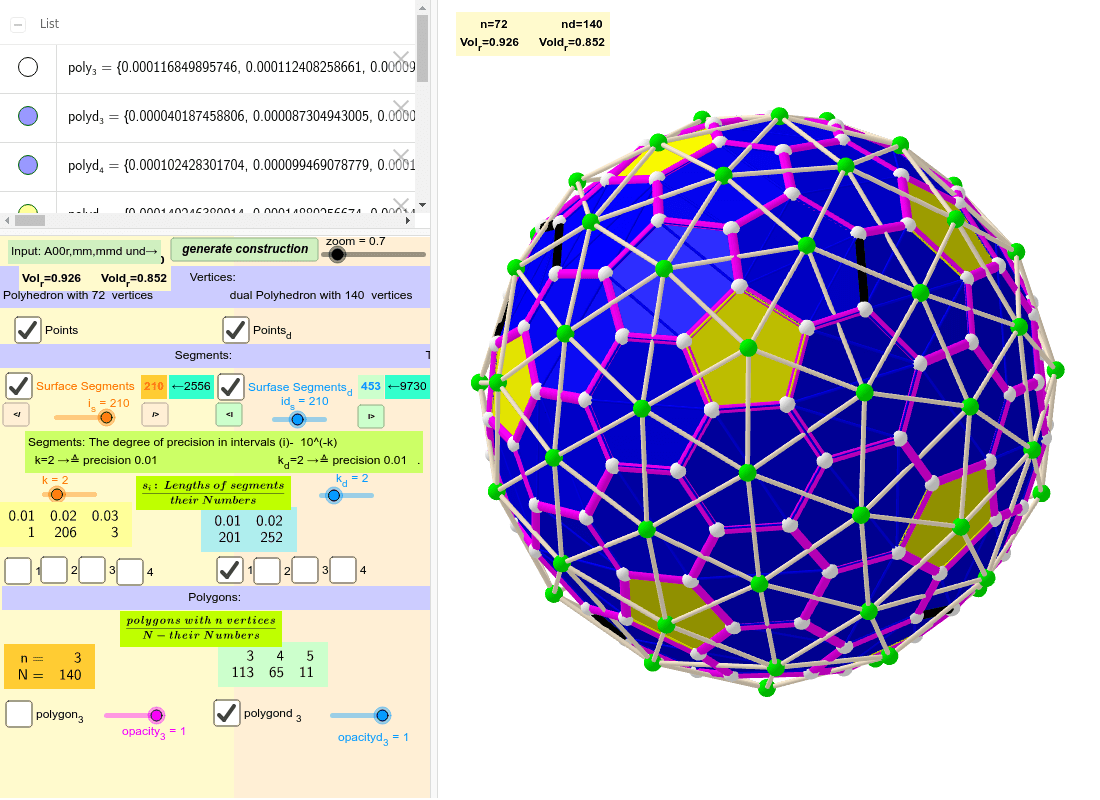
This example demonstrates the computer-aided construction of a 72-sided polyhedron. It involves core mathematical concepts like constructions, similar triangles, kites, general quadrilaterals, and 3D vectors. Key GeoGebra commands and objects used in the construction include Sequence, Sort, Element, and TableText, as outlined in the construction summary. Suitable for high school and above, this resource helps learners understand complex geometric constructions.
GeoGebra Commands & Parameters
Sequence(((zoom * Element[Element[A00, i], 1]), (zoom * Element[Element[A00, i], 2]), (zoom * Element[Element[A00, i], 3])), i, 1, Length[A00]) → A0Sort(Sequence[Segment[Element[A0, Element[Element[nom, i], 1]], Element[A0, Element[Element[nom, i], 2]]], i, 1, Length[nom]]) → SegmentsSequence(Element[Segments, i], i, 1, i_s) → Segments_oSort(Union[{}, ceil((Segments * 10^(k))) / 10^(k)]) → SegnSequence(KeepIf[If[i ≟ 1, x ≤ Element[Segn, i], If[i ≟ Length[Segn], Element[Segn, i - 1] < x, Element[Segn, i - 1] < x ≤ Element[Segn, i]]], Segments], i, 1, Length[Segn]) → la0Sequence(Length[Element[la0, i]], i, 1, Length[Segn]) → lLengthElement(la0, 1) → la1Element(la0, 2) → la2Element(la0, 3) → la3Element(la0, 4) → la4Sequence(((zoom * Element[Element[A00d, i], 1]), (zoom * Element[Element[A00d, i], 2]), (zoom * Element[Element[A00d, i], 3])), i, 1, Length[A00d]) → A0dSort(Sequence[Segment[Element[A0d, Element[Element[nomd, i], 1]], Element[A0d, Element[Element[nomd, i], 2]]], i, 1, Length[nomd]]) → SegmentsdSequence(Element[Segmentsd, i], i, 1, id_s) → Segmentsd_oSort(Union[{}, ceil((Segmentsd * 10^(k_d))) / 10^(k_d)]) → SegndSequence(KeepIf[If[i ≟ 1, x ≤ Element[Segnd, i], If[i ≟ Length[Segnd], Element[Segnd, i - 1] < x, Element[Segnd, i - 1] < x ≤ Element[Segnd, i]]], Segmentsd], i, 1, Length[Segnd]) → la0dSequence(Length[Element[la0d, i]], i, 1, Length[Segnd]) → lLengthdTableText({mm5ad, mm7ad}, "hr") → text2Element(la0d, 1) → la1dElement(la0d, 2) → la2dElement(la0d, 3) → la3dElement(la0d, 4) → la4dTableText({Segn, lLength}, "hr") → text8TableText({Segnd, lLengthd}, "hr") → text9TableText({Append["n=", mm5a], Append["N=", mm7a]}, "hr") → text1Sequence(Polygon[Element[A0, Element[Element[mm1, f], 1]], Element[A0, Element[Element[mm1, f], 2]], Element[A0, Element[Element[mm1, f], 3]]], f, 1, Length[mm1]) → poly_3Sequence(Polygon[Element[A0d, Element[Element[mm1d, f], 1]], Element[A0d, Element[Element[mm1d, f], 2]], Element[A0d, Element[Element[mm1d, f], 3]]], f, 1, Length[mm1d]) → polyd_3Sequence(Polygon[Element[A0d, Element[Element[Element[mm6d, 1], i], 1]], Element[A0d, Element[Element[Element[mm6d, 1], i], 2]], Element[A0d, Element[Element[Element[mm6d, 1], i], 3]], Element[A0d, Element[Element[Element[mm6d, 1], i], 4]]], i, 1, 65) → polyd_{4}Sequence(Polygon[Element[A0d, Element[Element[Element[mm6d, 2], i], 1]], Element[A0d, Element[Element[Element[mm6d, 2], i], 2]], Element[A0d, Element[Element[Element[mm6d, 2], i], 3]], Element[A0d, Element[Element[Element[mm6d, 2], i], 4]], Element[A0d, Element[Element[Element[mm6d, 2], i], 5]]], i, 1, 11) → polyd_{5}
AI Drawing Prompt Reference
Create a computer-aided construction of a 72-sided polyhedron, demonstrating core mathematical concepts like constructions, similar triangles, kites, general quadrilaterals, and 3D vectors. Start by generating a set of 3D points, then connect these points to form segments and sort them by length. Next, group and further sort these segments into multiple sequences. Finally, use these sequences to construct multiple polygons, including triangles and quadrilaterals, to form the complete structure of the 72-faced polyhedron, and label key data.
The prompt above was compiled from the original drawing commands and is for reference only.