
3D Vectors as Triangle Sides
Loading the math board and drawing, please wait…
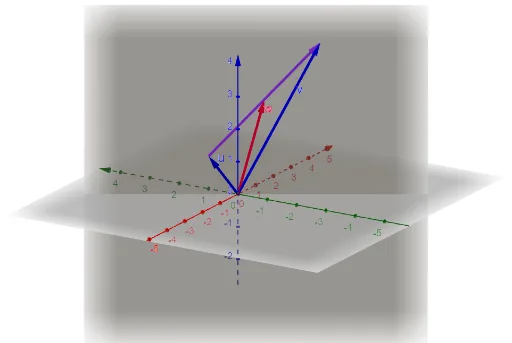
This example demonstrates constructing a triangle in 3D space using two vectors as its sides. Key math concepts include 3D vectors, line segments, plane constructions, and vector operations. It uses GeoGebra commands like Vector and Plane. Suitable for high school and above students learning solid geometry and vector mathematics, ideal for teaching demonstrations and geometric constructions.
GeoGebra Commands & Parameters
Vector((0, 1, 1)) → uVector((3, -1, 4)) → vVector((0, 1, 1), (3, -1, 4)) → aPlane((0, 1, 1), (0, 0, 0), (3, -1, 4)) → b
AI Drawing Prompt Reference
Draw a triangle in 3D space using two vectors as its sides. The first vector points to (0, 1, 1), and the second vector points to (3, -1, 4). These vectors can form the sides of the triangle, creating a 3D shape. Also, draw a plane that includes these vectors and the origin. Ensure the figure clearly shows the relationship between the vectors and the plane, suitable for geometric teaching demonstrations.
The prompt above was compiled from the original drawing commands and is for reference only.