
Area of Circle as Parallelogram Transformation
Loading the math board and drawing, please wait…
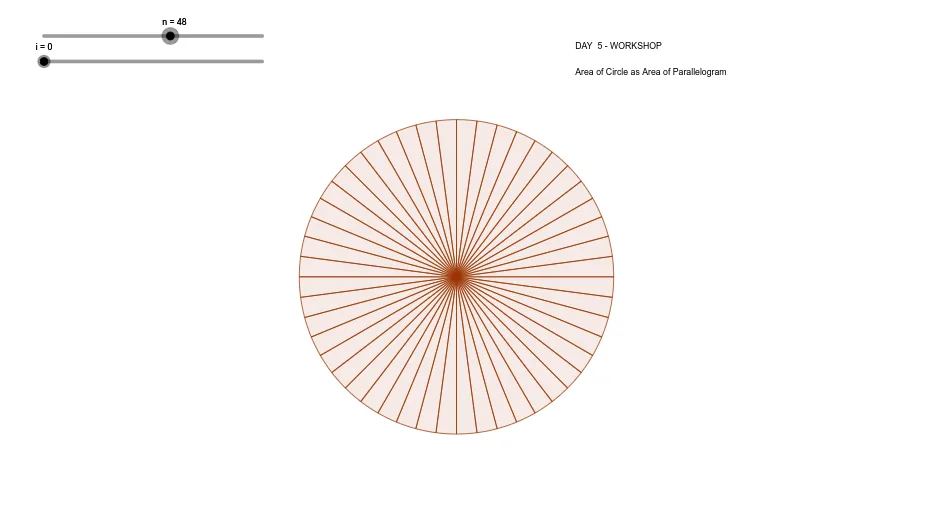
This example demonstrates how to transform the area of a circle into the area of a parallelogram. Key mathematical concepts include circles, parallelograms, and geometric transformations. GeoGebra commands used include Min, Intersect, Point, Rotate, Vector, and Translate. Suitable for middle school and above students learning geometric transformations and area calculations.
GeoGebra Commands & Parameters
Min(i, 1) → C1Intersect(xAxis, yAxis) → APoint(yAxis) → BRotate(B, (360 * ° / n), A) → B'_LRotate(B, (-360 * ° / n), A) → B'_RRotate(B3, B5 / 2, B7) → C7Rotate(B7, (-B$4), C7) → B8Rotate(C7, B$5, B8) → C8Rotate(B8, (-B$4), C8) → B9Rotate(C8, B$5, B9) → C9Rotate(B9, (-B$4), C9) → B10Rotate(C9, B$5, B10) → C10Rotate(B10, (-B$4), C10) → B11Rotate(C10, B$5, B11) → C11Rotate(B11, (-B$4), C11) → B12Rotate(C11, B$5, B12) → C12Rotate(B12, (-B$4), C12) → B13Rotate(C12, B$5, B13) → C13Rotate(B13, (-B$4), C13) → B14Rotate(C13, B$5, B14) → C14Rotate(B14, (-B$4), C14) → B15Rotate(C14, B$5, B15) → C15Rotate(B15, (-B$4), C15) → B16Rotate(C15, B$5, B16) → C16Rotate(B16, (-B$4), C16) → B17Rotate(C16, B$5, B17) → C17Rotate(B17, (-B$4), C17) → B18Rotate(C17, B$5, B18) → C18Rotate(B18, (-B$4), C18) → B19Rotate(C18, B$5, B19) → C19Rotate(B19, (-B$4), C19) → B20Rotate(C19, B$5, B20) → C20Rotate(B20, (-B$4), C20) → B21Rotate(C20, B$5, B21) → C21Rotate(B21, (-B$4), C21) → B22Rotate(C21, B$5, B22) → C22Rotate(B22, (-B$4), C22) → B23Rotate(C22, B$5, B23) → C23Rotate(B23, (-B$4), C23) → B24Rotate(C23, B$5, B24) → C24Rotate(B24, (-B$4), C24) → B25Rotate(C24, B$5, B25) → C25Rotate(B25, (-B$4), C25) → B26Rotate(C25, B$5, B26) → C26Rotate(B26, (-B$4), C26) → B27Rotate(C26, B$5, B27) → C27Vector(B7, C7) → uTranslate(CircleSector[C7, B8, B7], Vector[(C$2 * u)]) → D7Translate(CircleSector[C8, B9, B8], Vector[(C$2 * u)]) → D8Translate(CircleSector[F7, E7, E8], Vector[(C$2 * u)]) → G7Translate(CircleSector[F8, E8, E9], Vector[(C$2 * u)]) → G8Translate(CircleSector[I7, H7, H8], Vector[((-C$2) * u)]) → J7Translate(CircleSector[L7, K8, K7], Vector[((-C$2) * u)]) → M7Translate(CircleSector[L8, K9, K8], Vector[((-C$2) * u)]) → M8Translate(CircleSector[I8, H8, H9], Vector[((-C$2) * u)]) → J8Translate(CircleSector[C9, B10, B9], Vector[(C$2 * u)]) → D9Translate(CircleSector[F9, E9, E10], Vector[(C$2 * u)]) → G9Translate(CircleSector[L9, K10, K9], Vector[((-C$2) * u)]) → M9Translate(CircleSector[I9, H9, H10], Vector[((-C$2) * u)]) → J9Translate(CircleSector[C10, B11, B10], Vector[(C$2 * u)]) → D10Translate(CircleSector[F10, E10, E11], Vector[(C$2 * u)]) → G10Translate(CircleSector[L10, K11, K10], Vector[((-C$2) * u)]) → M10Translate(CircleSector[I10, H10, H11], Vector[((-C$2) * u)]) → J10Translate(CircleSector[C11, B12, B11], Vector[(C$2 * u)]) → D11Translate(CircleSector[F11, E11, E12], Vector[(C$2 * u)]) → G11Translate(CircleSector[L11, K12, K11], Vector[((-C$2) * u)]) → M11Translate(CircleSector[I11, H11, H12], Vector[((-C$2) * u)]) → J11Translate(CircleSector[C12, B13, B12], Vector[(C$2 * u)]) → D12Translate(CircleSector[F12, E12, E13], Vector[(C$2 * u)]) → G12Translate(CircleSector[L12, K13, K12], Vector[((-C$2) * u)]) → M12Translate(CircleSector[I12, H12, H13], Vector[((-C$2) * u)]) → J12Translate(CircleSector[C13, B14, B13], Vector[(C$2 * u)]) → D13Translate(CircleSector[F13, E13, E14], Vector[(C$2 * u)]) → G13Translate(CircleSector[L13, K14, K13], Vector[((-C$2) * u)]) → M13Translate(CircleSector[I13, H13, H14], Vector[((-C$2) * u)]) → J13Translate(CircleSector[C14, B15, B14], Vector[(C$2 * u)]) → D14Translate(CircleSector[F14, E14, E15], Vector[(C$2 * u)]) → G14Translate(CircleSector[L14, K15, K14], Vector[((-C$2) * u)]) → M14Translate(CircleSector[I14, H14, H15], Vector[((-C$2) * u)]) → J14Translate(CircleSector[C15, B16, B15], Vector[(C$2 * u)]) → D15Translate(CircleSector[F15, E15, E16], Vector[(C$2 * u)]) → G15Translate(CircleSector[L15, K16, K15], Vector[((-C$2) * u)]) → M15Translate(CircleSector[I15, H15, H16], Vector[((-C$2) * u)]) → J15Translate(CircleSector[C16, B17, B16], Vector[(C$2 * u)]) → D16Translate(CircleSector[F16, E16, E17], Vector[(C$2 * u)]) → G16Translate(CircleSector[L16, K17, K16], Vector[((-C$2) * u)]) → M16Translate(CircleSector[I16, H16, H17], Vector[((-C$2) * u)]) → J16Translate(CircleSector[C17, B18, B17], Vector[(C$2 * u)]) → D17Translate(CircleSector[F17, E17, E18], Vector[(C$2 * u)]) → G17Translate(CircleSector[L17, K18, K17], Vector[((-C$2) * u)]) → M17Translate(CircleSector[I17, H17, H18], Vector[((-C$2) * u)]) → J17Translate(CircleSector[C18, B19, B18], Vector[(C$2 * u)]) → D18Translate(CircleSector[F18, E18, E19], Vector[(C$2 * u)]) → G18Translate(CircleSector[L18, K19, K18], Vector[((-C$2) * u)]) → M18Translate(CircleSector[I18, H18, H19], Vector[((-C$2) * u)]) → J18Translate(CircleSector[C19, B20, B19], Vector[(C$2 * u)]) → D19Translate(CircleSector[F19, E19, E20], Vector[(C$2 * u)]) → G19Translate(CircleSector[L19, K20, K19], Vector[((-C$2) * u)]) → M19Translate(CircleSector[I19, H19, H20], Vector[((-C$2) * u)]) → J19Translate(CircleSector[C20, B21, B20], Vector[(C$2 * u)]) → D20Translate(CircleSector[F20, E20, E21], Vector[(C$2 * u)]) → G20Translate(CircleSector[L20, K21, K20], Vector[((-C$2) * u)]) → M20Translate(CircleSector[I20, H20, H21], Vector[((-C$2) * u)]) → J20Translate(CircleSector[C21, B22, B21], Vector[(C$2 * u)]) → D21Translate(CircleSector[F21, E21, E22], Vector[(C$2 * u)]) → G21Translate(CircleSector[L21, K22, K21], Vector[((-C$2) * u)]) → M21Translate(CircleSector[I21, H21, H22], Vector[((-C$2) * u)]) → J21Translate(CircleSector[C22, B23, B22], Vector[(C$2 * u)]) → D22Translate(CircleSector[F22, E22, E23], Vector[(C$2 * u)]) → G22Translate(CircleSector[L22, K23, K22], Vector[((-C$2) * u)]) → M22Translate(CircleSector[I22, H22, H23], Vector[((-C$2) * u)]) → J22Translate(CircleSector[C23, B24, B23], Vector[(C$2 * u)]) → D23Translate(CircleSector[F23, E23, E24], Vector[(C$2 * u)]) → G23Translate(CircleSector[L23, K24, K23], Vector[((-C$2) * u)]) → M23Translate(CircleSector[I23, H23, H24], Vector[((-C$2) * u)]) → J23Translate(CircleSector[C24, B25, B24], Vector[(C$2 * u)]) → D24Translate(CircleSector[F24, E24, E25], Vector[(C$2 * u)]) → G24Translate(CircleSector[L24, K25, K24], Vector[((-C$2) * u)]) → M24Translate(CircleSector[I24, H24, H25], Vector[((-C$2) * u)]) → J24Translate(CircleSector[C25, B26, B25], Vector[(C$2 * u)]) → D25Translate(CircleSector[F25, E25, E26], Vector[(C$2 * u)]) → G25Translate(CircleSector[L25, K26, K25], Vector[((-C$2) * u)]) → M25Translate(CircleSector[I25, H25, H26], Vector[((-C$2) * u)]) → J25Translate(CircleSector[C26, B27, B26], Vector[(C$2 * u)]) → D26Translate(CircleSector[F26, E26, E27], Vector[(C$2 * u)]) → G26Translate(CircleSector[L26, K27, K26], Vector[((-C$2) * u)]) → M26Translate(CircleSector[I26, H26, H27], Vector[((-C$2) * u)]) → J26
AI Drawing Prompt Reference
Draw a circle and transform its area into a parallelogram. Start with coordinate axes and a point on the y-axis as the radius endpoint. Rotate this point around the center by equal angular steps (360 degrees divided by the number of sectors) to generate a series of sector vertices, connecting adjacent vertices to form triangular sectors. Then translate the first sector to align with the others, assembling them into a parallelogram-like shape. Include the circle, the rotated sectors, the translation vector, and the final parallelogram outline to illustrate the area conversion.
The prompt above was compiled from the original drawing commands and is for reference only.