
Tangent Line to a Parabola at a Given Point
Loading the math board and drawing, please wait…
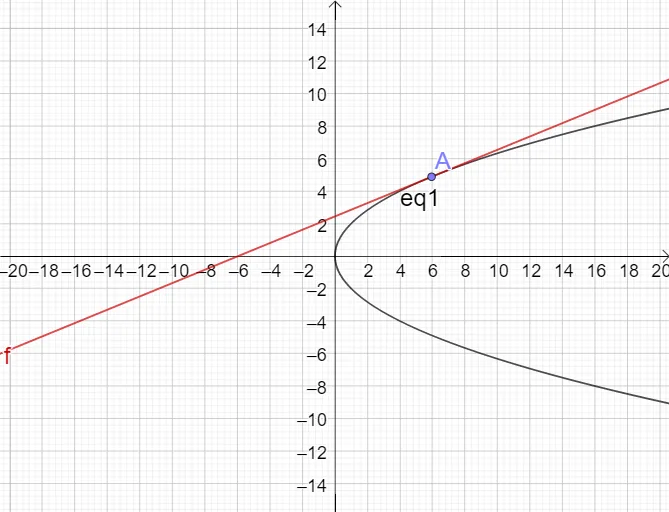
This example demonstrates how to select a specific point on a parabola and construct the tangent line at that point, making the local “instantaneous direction of change” visually clear. It focuses on core ideas such as function graphs, tangency, and the geometric meaning of derivatives (the tangent slope equals the instantaneous slope). Construction-wise, it uses GeoGebra objects and commands indicated in the provided summary: the Point command to define key points (e.g., a, A), the parabola equation (eq1), and auxiliary parameters/objects (such as m and f) that represent the function/relationship used to determine the tangent direction. The resulting construction links the chosen point’s position on the curve with the slope of the tangent. Suitable for advanced high school and introductory undergraduate calculus teaching, as well as student exploration for building intuition about tangents and derivative-based slope.
GeoGebra Commands & Parameters
Point(eq1) → A
AI Drawing Prompt Reference
Draw a parabola and select a point A on it. Construct the tangent line at point A to show the instantaneous direction of change. First input the parabola equation, then select point A on the parabola, and finally construct the tangent line based on the position of point A.
The prompt above was compiled from the original drawing commands and is for reference only.