
3D Modeling: The BIG PICTURE
Loading the math board and drawing, please wait…
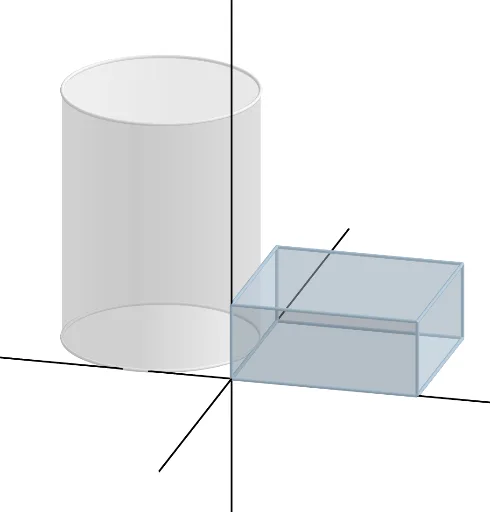
This example demonstrates how to use GeoGebra to build 3D shapes, focusing on prisms and cylinders. Key mathematical concepts include solid geometry, prisms, and cylinders, as well as the application of linear functions. Using commands like Polygon, Prism, Circle, Cylinder, and Line, the example constructs the faces and edges of prisms and cylinders. Suitable for high school math education and students learning solid geometry.
GeoGebra Commands & Parameters
Polygon(A, B, C, D) → q1, a_1, b, c, dPrism(q1, (3.6 * a)) → e, E, edgeAE, edgeBF, edgeCG, edgeDH, edgeEF, edgeFG, edgeGH, edgeEH, F, G, H, faceABFE, faceBCGF, faceCDHG, faceADHE, faceEFGHCircle(I, (4.55 * a), z = 0) → fCylinder(f, (12 * a)) → g, h, iLine((0, 0, 0), (1, 0, 0)) → jLine((0, 0, 0), (0, 1, 0)) → kLine((0, 0, 0), (0, 0, 1)) → l
AI Drawing Prompt Reference
Create a 3D prism and cylinder model. Start by drawing a quadrilateral ABCD, then construct a prism with this quadrilateral as the base, where the height is 3.6 times the length of the quadrilateral's sides. Next, draw a circle in the xoy plane with a radius of 4.55 times the side length of the quadrilateral, and construct a cylinder with this circle as the base, where the height is 12 times the diameter of the circle. Finally, draw three axes representing the x-axis, y-axis, and z-axis.
The prompt above was compiled from the original drawing commands and is for reference only.