
2D Vectors and Geometric Transformations Demo
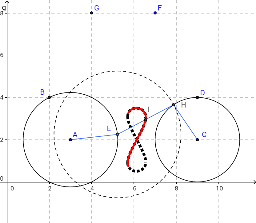
Loading the math board and drawing, please wait…
This example dynamically demonstrates 2D vector operations and geometric transformations, revealing the geometric meaning of vector addition, scalar multiplication, and rotation; involves core math concepts like vectors, geometric transformations, limits and continuity, and parabolas; construction highlights the use of GeoGebra commands such as Circle, Point, Intersect, Segment, Midpoint, Locus, and LocusEquation; suitable for high school and above learners to understand the visual representation of vectors, geometric transformations, and the application of advanced mathematical concepts.
GeoGebra Commands & Parameters
Circle(A, B) → cCircle(C, D) → dPoint(c) → ECircle(E, Segment[F, G]) → eIntersect(d, e, 2) → HSegment(A, E) → bSegment(H, C) → fSegment(E, H) → aMidpoint(a) → ILocus(I, E) → loc1LocusEquation(I, E) → g
AI Drawing Prompt Reference
Create a dynamic diagram illustrating 2D vectors and geometric transformations. Start with two circles. Pick a point on the first circle, use it as the center of a third circle whose radius equals a given segment length, and intersect this third circle with the second circle to get a point. Connect the first circle's center to the moving point, the second circle's center to the intersection point, and the moving point to the intersection point, forming three segments. Take the midpoint of the segment between the moving point and the intersection, then trace the locus of this midpoint as the moving point travels along the first circle, and also display the equation of that locus. This shows the geometric meaning of vector addition, scalar multiplication, and rotation.
The prompt above was compiled from the original drawing commands and is for reference only.